
How to Improve Core Web Vitals for SEO
Improve Core Web Vitals for SEO by fixing LCP, INP, and CLS with CrUX field data and PageSpeed lab checks, then re-measure after each deploy.

How to improve Core Web Vitals for SEO: measure LCP, INP, and CLS on real users in CrUX, reproduce bottlenecks in PageSpeed Insights, fix the worst template first, and confirm the same URLs pass field thresholds after your next release.
Page experience is not a substitute for relevance, but slow or jumpy pages lose clicks, waste crawl budget on retries, and make even strong content harder to trust. Google documents Core Web Vitals as part of page experience guidance (Search Central Core Web Vitals). The work below stays practical: one metric family at a time, tied to URLs that already earn impressions.
Why Core Web Vitals matter for SEO
Search engines still need to fetch, render, and score your HTML. When templates are slow or unstable, crawlers spend more time per URL and users abandon before they read the answer. That hurts pages you already invested in, especially comparison posts, long guides, and landing pages where the first screen must prove intent fast.
Core Web Vitals are not the only ranking signal. They sit beside intent match, internal links, and competitive depth. They do show up in Search Console as URL-level field reports, which makes them one of the few experience metrics you can tie to a specific template group. Treat them like technical SEO debt with a measurable before and after, similar to how you would track index coverage after a canonical fix.
If your content plan already maps pages to queries, add CWV checks to the same queue. The SEO content strategy playbook covers planning and technical gates before publish, including when to batch-test templates with PageSpeed Insights during audits.
LCP, INP, and CLS in plain language
Each Core Web Vital answers a different user complaint. Fix the metric that fails field data on your money URLs first, not the one that looks worst in a one-off Lighthouse run on your laptop.
| Metric | What it measures | Good threshold (75th percentile field data) |
|---|---|---|
| LCP (Largest Contentful Paint) | When the largest visible content element paints | 2.5 seconds or less |
| INP (Interaction to Next Paint) | Responsiveness to taps, clicks, and keyboard input | 200 milliseconds or less |
| CLS (Cumulative Layout Shift) | Unexpected layout movement while the page loads | 0.1 or less |
LCP usually points at hero images, web fonts, render-blocking scripts, or slow server time to first byte. INP often traces to long JavaScript tasks on interactive pages. CLS comes from images or ads without reserved space, late-injected banners, or fonts that swap metrics after text already rendered.
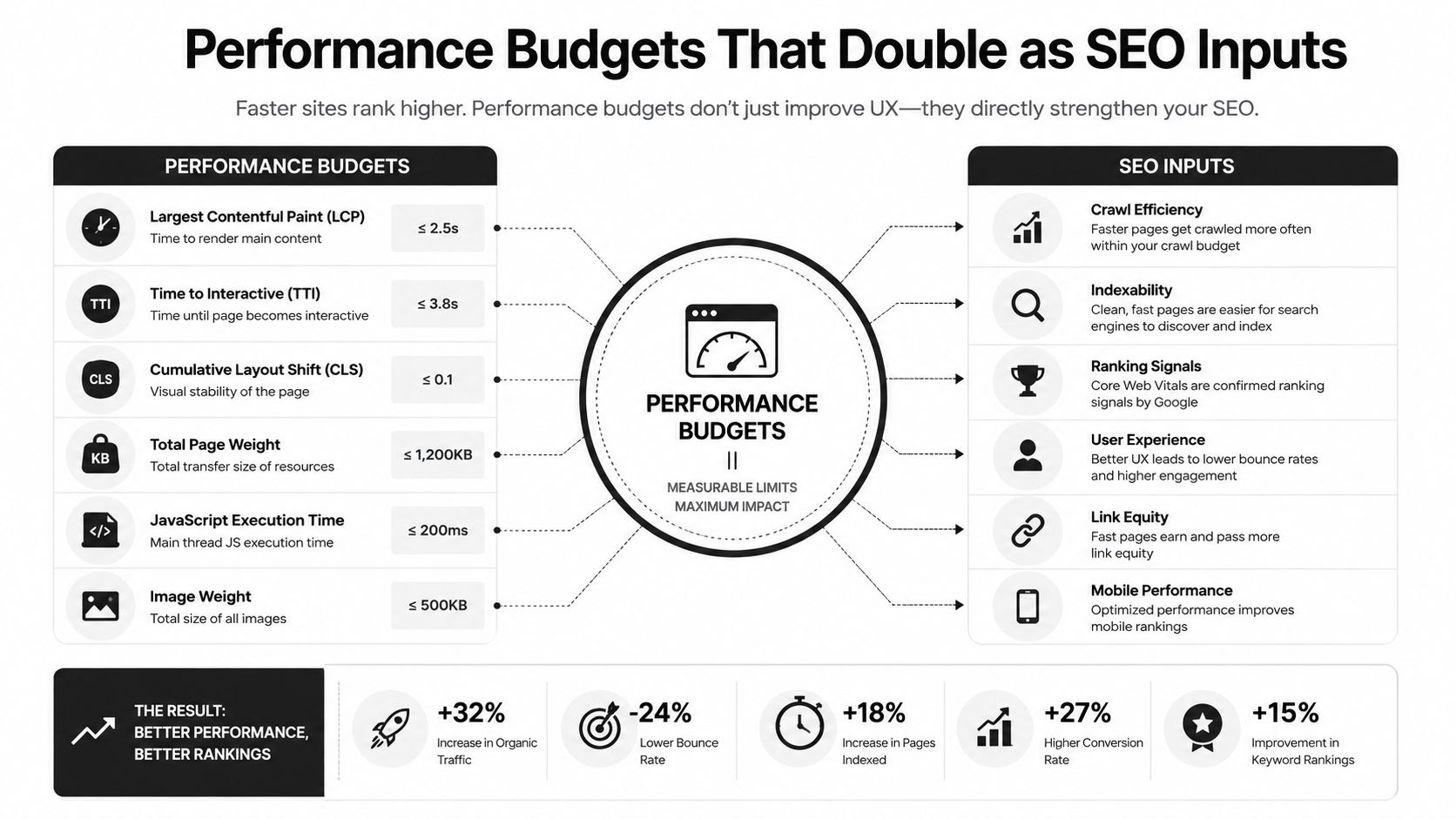
For developer-owned sites, the same trio belongs in performance budgets alongside crawl rules. The SEO for developers guide walks through treating CWV as a release gate with Search Console feedback.
Diagnose with CrUX and PageSpeed
Start with field data, then use lab tools to explain it. Field data tells you whether real Chrome users on your URLs actually suffer. Lab data tells you which resource or script to change this week.
CrUX and Search Console
- Open Search Console → Experience → Core Web Vitals and group failures by template or URL pattern.
- Use the Chrome UX Report (CrUX) API or BigQuery export when you need historical slices by origin or URL.
- Segment mobile and desktop separately. A desktop pass does not rescue mobile rankings when most impressions are mobile.
- Prioritize URLs with impressions and clicks today, not staging hosts or thin parameter variants you plan to canonicalize later.
CrUX uses a rolling 28-day window at the 75th percentile. A single deploy will not flip the report overnight. That is normal. Capture a baseline screenshot or export before you change the template so you can compare the same URL group four weeks later.
PageSpeed Insights and Lighthouse
Run PageSpeed Insights on a failing production URL, not a local build with different caching. Read both the field summary (when CrUX has enough traffic) and the Lighthouse lab diagnostics. Focus on opportunities that mention LCP element timing, JavaScript execution time, or layout shift sources.
Repeat the test on a cold cache and again on a warm cache if you use a CDN. TTFB problems show up in both; client-only optimizations may look great locally and still fail field data when HTML is slow.
Practical rule: if CrUX says "needs improvement" but lab scores are green, trust CrUX and inspect real-user network conditions, ads, and third parties that lab runs skip.
For landing pages where speed sits in the same backlog as conversion work, pair this diagnosis pass with the speed bucket in the landing page optimization playbook, which treats LCP and INP as experiment inputs rather than vanity scores.
Fix Largest Contentful Paint (LCP)
Identify the LCP element in PageSpeed Insights or Chrome DevTools Performance panel. On marketing sites it is often a hero image, a large heading block, or a video poster. Fix the element itself before micro-optimizing unrelated assets.
- Images: serve modern formats, size to displayed dimensions, and mark the hero with
fetchpriority="high"while keeping lazy loading off the LCP image. - Fonts: subset weights you use, preload only critical faces, and avoid invisible text flashes that delay perceived load.
- Scripts: defer or async non-critical JavaScript; remove tag managers you no longer read.
- Server: cut TTFB with caching, database query fixes, or edge HTML caching for anonymous pages.
Ship one LCP change per template, then re-run PageSpeed on the same URL. When the LCP element time drops in lab and TTFB is stable, wait for CrUX to reflect mobile traffic on that template.
Fix Interaction to Next Paint (INP)
INP replaced First Input Delay because pages that look loaded can still feel frozen. INP captures the slow interaction across the whole visit, not just the first click.
- Break up long tasks above 50 ms on the main thread; split hydration for below-the-fold widgets.
- Reduce JavaScript shipped to pages that are mostly static content; server-render HTML that does not need client state.
- Audit listeners on scroll and resize; throttle or move work off the main thread.
- Test on mid-tier Android hardware, not only a developer laptop.
Marketing articles with heavy embeds, chat widgets, and A/B snippets are frequent INP offenders. Remove or delay widgets below the fold until after the primary content is interactive.
Fix Cumulative Layout Shift (CLS)
CLS failures feel like the page fighting the user: buttons move, text jumps, consent banners shove content downward. Search engines treat that as poor experience even when copy is excellent.
- Always set
widthandheight(or aspect-ratio CSS) on images and video containers. - Reserve space for ad slots and promo strips with min-height placeholders.
- Inject cookie or newsletter banners without pushing main content after paint, or anchor them outside the reading column.
- Prefer
font-display: optionalor matched fallback metrics when swap causes large reflows.
Article templates should never load a web font that changes line lengths after the hero renders. That pattern shows up as CLS on long-form SEO posts even when LCP looks acceptable.
Measure again after you ship
Performance work without a measurement loop becomes guesswork. After each template change, record the same four numbers for the affected URL group:
- CrUX status for LCP, INP, and CLS on mobile and desktop.
- Median LCP from PageSpeed field data when available.
- Search Console clicks and impressions on the template (did speed help retention of rankings?).
- Lab LCP element and total blocking time from Lighthouse for regression tests.
Compare like for like. If you changed only the blog hero pipeline, do not mix product app URLs into the same chart. If you changed CDN caching, wait for cache hit rates to stabilize before declaring victory.
When you need quick on-page checks between full CWV cycles, the Orchory free SEO tools catalog includes utilities that complement Search Console, not replace CrUX.
Fast pages and cite-ready SEO
Modern SEO pages must do two jobs at once: answer the query clearly enough to rank or be quoted, and load fast enough that users and crawlers actually consume them. Thin copy on a fast template still fails intent. Excellent copy on a three-second LCP template still bleeds clicks to a competitor that answers the same question sooner.
Orchory focuses on cite-ready pages: structured headings, extractable facts, and internal links that match how buyers search. Speed belongs in the same brief as schema and canonicals. When your team ships new SEO pages through an auto SEO tool workflow, bake LCP element choice, image dimensions, and script budget into the template before you scale to dozens of URLs.
If you want help prioritizing which templates to fix first, send your site and point to the Search Console CWV export. Orchory builds your first page before the call so you can see how fast, cite-ready content is supposed to feel on your own domain.
Paid plans start at $990/mo when you move from that first page into ongoing page production; cancel anytime if the pipeline does not fit.
