
SEO for Developers: Owning Search Visibility from the Codebase
A practical, code-first guide to SEO for developers: crawlability, schema, canonicals, performance budgets, CI gates, and Search Console loops.

You're probably in the middle of a familiar mess. A feature just shipped, the PR queue is full, and someone on the team is asking why the new landing page still isn't showing up in search. There's no in-house SEO person to hand it off to, so the same developer who fixed the layout bug is now staring at robots.txt, a canonical tag, and a Search Console tab, trying to figure out which change matters.
That's the right place to own SEO for developers. On code-heavy SaaS sites, search visibility isn't just copywriting, it's rendering, crawlability, page structure, and deploy hygiene. The person who already controls the HTML, the headers, the build pipeline, and the release process is also the person who can fix the indexing problem without waiting on a separate team.
The Developer's Case for Owning SEO
You know the scene. A founder, maybe two engineers, maybe you alone, ships product all week and keeps organic traffic on life support between standups. There is no SEO specialist sitting in a corner with a dashboard, so every search issue lands on the same person who merges the code. That is not a staffing problem to solve later, it is the operating model you already have.
The working thesis is simple, SEO for developers is partly an engineering problem because the code controls what search engines can reach, render, and trust. Google's SEO Starter Guide points to accessible, well-organized pages, and developer-focused guidance points to server-side or static rendering for important pages, clean internal links, and structured data so search engines can understand content without depending on a heavy client-side app. Crawlers interact with the site you shipped based on accessible pages, server-side rendering, clean internal links, and structured data.
Why the code owner is the SEO owner
A marketer can tell you a page should rank. A developer can tell you whether Google can fetch the page, whether the canonical points to the right URL, whether the route is accidentally noindex, and whether the important HTML exists before JavaScript finishes hydrating. Those are different failure modes, and they live in different files. If the site is code-heavy, the person who owns the repo owns the outcome.
Practical rule: if a search issue can be fixed by changing a route, a template, a header, or a build step, it belongs in the engineering backlog.
That shift matters because most SEO advice is written for CMS users and marketers, not for teams that ship via pull request. The next sections stay grounded in things you can touch, robots.txt, sitemap generation, JSON-LD, canonical tags, performance budgets, CI checks, and Search Console. If you have ever debugged a canonical tag at 11pm, this will feel like home.
Crawlability and Indexability as Code You Ship
Start with the boring files, because boring files decide whether the rest of the work matters at all. The practical SEO work lives in robots.txt, sitemap generation, canonical URLs, and noindex handling, not in a later polish pass. If those pieces are wrong, the page can look fine in the browser and still fail in search.
Fix the blockages first
If robots.txt blocks a stylesheet, script, or image the page needs, crawlers may not see the page the way users do. If your sitemap includes redirected URLs, parameter variants, or pages you never want indexed, you are sending search engines into dead ends. If a priority route inherits an accidental noindex, the content can be perfect and still vanish from search. Those failures belong in the same backlog as a broken API call or a bad deployment.
A practical order looks like this:
- Unblock the assets the page needs. Let the CSS, JavaScript, and images required for rendering stay reachable.
- Trim the XML sitemap. Keep only canonical, indexable URLs in it.
- Audit
noindexon production routes. A staging setting should never leak into a live page. - Find crawl traps. Faceted navigation, pagination loops, and endless parameter combinations waste crawl budget.
- Remove the
meta keywordstag. Google does not use it, so it is dead weight in the template (Google's SEO Starter Guide, Google's SEO guidance on the meta keywords tag).
A robots.txt file should stay simple:
- Allow public assets: keep the stylesheets, scripts, and images needed for rendering reachable.
- Disallow admin and internal search paths: keep private or low-value routes out of crawlers.
- Point to one sitemap index: make discovery tidy and predictable.
The sitemap should contain the URLs you want indexed, not every preview route, parameterized variant, or redirected slug. If a URL is not the canonical version, leave it out. That keeps the crawler focused on the pages that matter.
A useful repo check looks like this:
robots.txtsanity: essential assets are reachable, private routes are blocked.- Sitemap hygiene: only canonical URLs are listed.
- Production headers: no accidental
noindex. - URL traps: faceted filters, pagination loops, and parameter combinations are controlled.
- Meta cleanup: remove
meta keywords. - Render path check: important HTML is present in the response your crawler gets, not only after hydration.
- Pull request review: route changes, template changes, and build changes get checked before merge.
That is the developer version of crawlability. It is a set of files and tests you ship with the rest of the code, and the developer owns both the implementation and the indexing outcome.
Schema, Canonical, and Hreflang as Three Small Files
Structured data and duplication control should live in code, not in a mystery plugin buried in a CMS. For SaaS and developer tools, the useful JSON-LD types are Article, FAQPage, Organization, and SoftwareApplication. Those cover most product pages, docs, blog posts, and support content without turning your templates into a schema museum.
Write the JSON-LD where the page is rendered
A minimal Article block can sit in the page template or a shared component:
{
  "@context": "https://schema.org",
  "@type": "Article",
  "headline": "SEO for Developers",
  "author": {
    "@type": "Organization",
    "name": "Orchory"
  }
}
For FAQ content, use FAQPage only when the page really contains a question-and-answer pair. For a product page, SoftwareApplication is the better fit if you're describing software. Organization belongs on the company entity, often alongside the homepage or about page. The point is accuracy, not volume.
Canonical tags are the other small file that saves you from duplicate-page chaos. Keep the default in your layout head:
<link rel="canonical" href="https://example.com/pricing" />
If your app serves trailing-slash and non-trailing-slash variants, or creates parameterized URLs for the same content, pick one canonical and make every other variant point there. Don't leave that choice to the crawler.
Pick the tag that matches the problem
| Problem | File or tag to change | What it controls |
|---|---|---|
| Product, article, or FAQ content needs machine-readable context | JSON-LD | How the page describes itself |
| Same page exists in multiple URL variants | Canonical tag | Which URL should be indexed |
| Same content exists in multiple languages or regions | Hreflang | Which localized version should surface |
| Search engines need company identity | Organization schema | Brand-level entity signals |
Hreflang belongs in the same mental bucket as canonicals, but only when you have localized pages. Don't add it because a checklist told you to. Add it when there's real language or regional duplication to resolve.
If you're using a shared layout, keep the logic in one place, usually something like src/components/Seo.astro, app/layout.tsx, or your equivalent template wrapper. That keeps canonical behavior consistent across the site instead of forcing every page author to remember the same rules.
Performance Budgets That Double as SEO Inputs
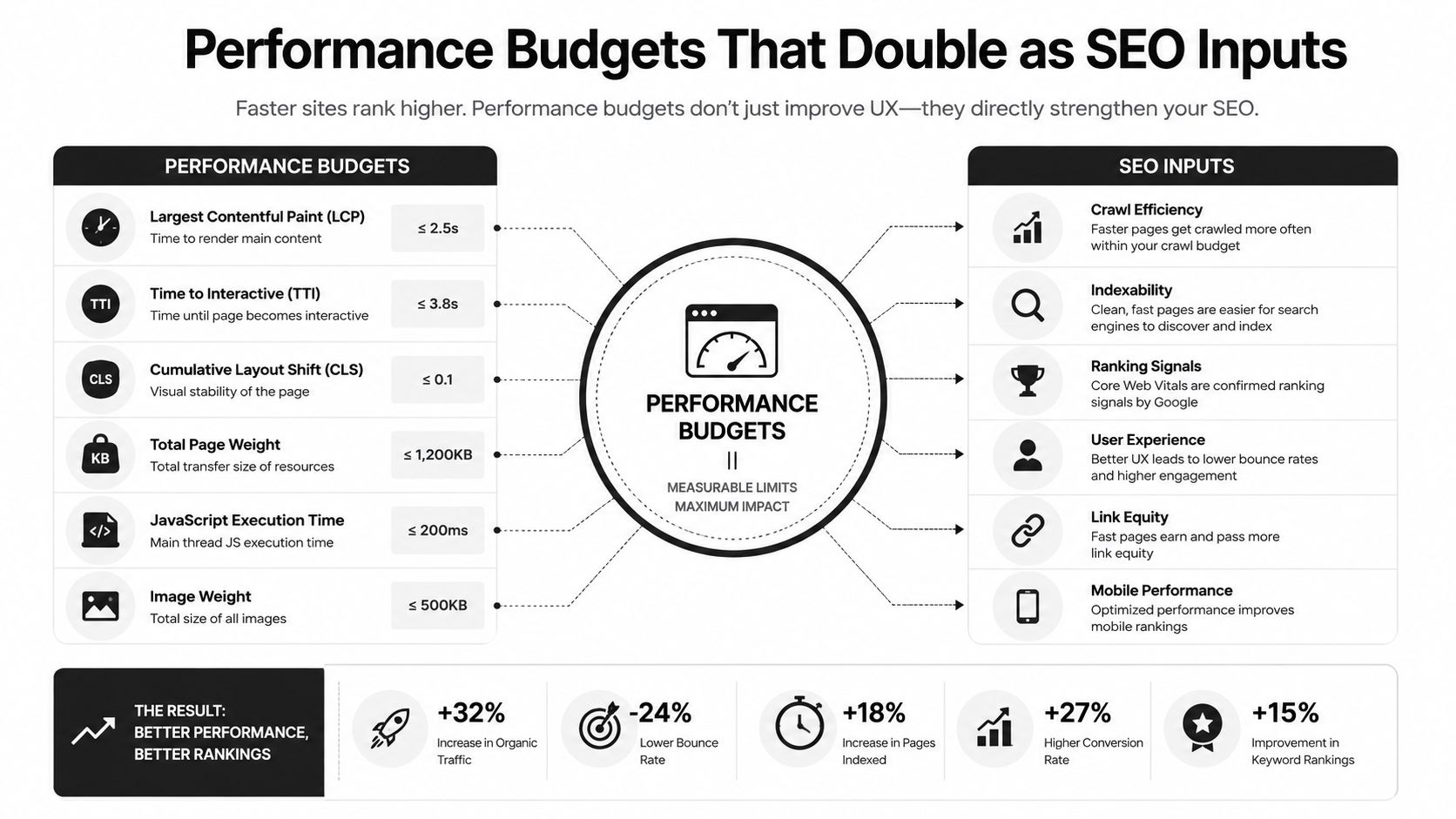
Performance is part of SEO output. If a page is slow to render, hard to parse, or unstable while loading, crawlers and users both pay for it. Treat Core Web Vitals as engineering budgets, not as a report you glance at after launch.
Measure the page like an engineer
A page that sends meaningful HTML early is easier to index cleanly than one that only becomes understandable after a long client-side render. That trade-off is real, and developers control most of it. Server-side rendering or static generation gets useful content into the document sooner, which gives crawlers something to process before the JavaScript app finishes hydrating.
I usually treat this as a release gate, not a nice-to-have. Measure the affected route group before the deploy, then measure the same routes again after the change ships. Keep an eye on TTFB, LCP, INP, and CLS, and compare lab results with field data in Search Console and CrUX so you can tell whether the change helped real users or only looked good in a synthetic test.
If a page feels slow, inspect the waterfall before blaming the framework. One render-blocking script, a late-loading hero image, or an oversized client bundle can push LCP out of range. The fix is often mechanical, move a script to defer, reduce the client-side surface area, or change image priority on the landing page.
Log the exact route, deployment SHA, measured TTFB, and the script or asset changed in the PR description. That gives you a trail you can compare with later indexing and performance data. If you want quick checks for this kind of review, Orchory Free SEO Tools fits into the same workflow as the rest of your measurement stack.
Linting, Testing, and CI Gates for SEO
A bad SEO change usually looks harmless in code review. A template still renders, the route still loads, and the PR gets merged. Then the page disappears from search, the canonical points somewhere odd, or the schema breaks in a way nobody notices until traffic drops.
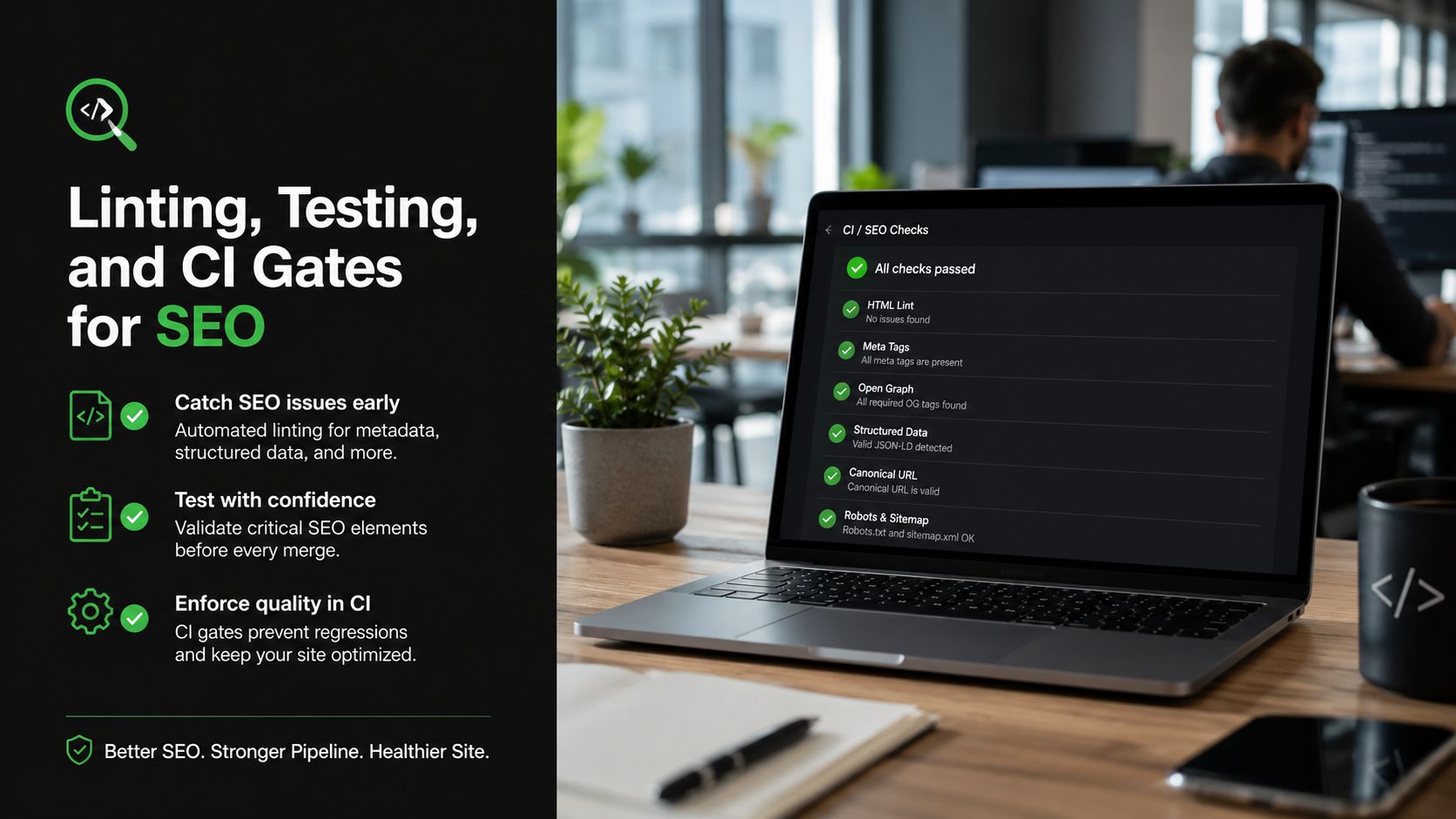
Treat those failures like any other bug class. If a PR can ship a broken test or a missing migration, it can also ship a blocked page, a bad canonical, or invalid schema. The practical answer is a small set of checks that run on every pull request and fail loudly when something breaks.
The checks worth wiring first
Start with the checks that catch the expensive mistakes:
- Canonical required on indexable routes. If a production page should be indexed, it needs a canonical.
- No accidental
noindexin production. This is the fastest way to disappear. - Schema validates against schema.org. Invalid JSON-LD is dead weight.
- Sitemap contains only canonical URLs. Redirects and duplicates don't belong there.
- Lighthouse in CI. It won't tell you everything, but it catches obvious performance regressions.
A GitHub Actions workflow can run three things in sequence, Lighthouse CI, a schema validator, and a sitemap linter. If any of them fails, the PR stays red until the issue is fixed. That makes SEO part of the deploy contract instead of a post-release audit.
The implementation does not need to be fancy. A simple pipeline might look like this:
- Build the app.
- Run a schema validator against sample pages.
- Check sitemap URLs against the canonical map.
- Run Lighthouse CI on the priority routes.
- Fail the PR if any route is blocked, missing canonical, or badly formed.
A check in CI is a control. Without it, you are relying on hope.
For backlog input, do not rely only on keyword tools. Technical queries are often underrepresented there, so use support tickets, GitHub issues, and forum threads as test fixtures and page ideas. That gives you real language from users, which is often better than broad-volume keyword lists for developer audiences, and it pairs well with developer-audience guidance.
If you are using a coding agent to generate the PRs, keep the agent focused on the files that matter, templates, schema components, sitemap generation, and route metadata. Let the CI tell you whether the output is safe. For more on automating this kind of work, see SEO tasks you can automate with AI agents.
Measuring Outcomes with Search Console as the Feedback Loop
Search Console is production telemetry for SEO. Treat it that way. The useful data is not a monthly summary slide, it's the set of fields that let you connect a code change to a search outcome without guessing.
What to pull every week
The weekly review can stay short if you focus on the right exports and API queries:
- Top queries per page. This shows whether the page is matching the intent you expected.
- Index coverage errors. This catches pages that are being excluded or mishandled.
- Core Web Vitals field data by URL group. This tells you whether your performance work shows up in real-user data.
- Click and impression context together. Total impressions alone can mislead you.
Map each deploy to a GSC signal. If you changed the rendering path, compare the affected URL group before and after the release. If you fixed a canonical issue, watch the coverage state. If you improved LCP, give it time, then check whether the affected pages are being discovered and clicked more cleanly. Search Console won't give you instant causality, but it will show the direction if you keep the scope tight.
A 15-minute weekly ritual is enough:
- Open the URL group you changed.
- Check coverage warnings.
- Compare top queries and clicks.
- Note whether the page is holding the intended intent.
- Write the result back into the backlog.
Practical rule: if you can't point to a page, a query, and a deploy SHA, you don't have a measurement loop yet.
The developer-owned model pays off. The same person who changed the template can see whether the page got healthier in Search Console. No handoff. No separate reporting layer. Just a loop from code to crawler to feedback.
The PR-Based SEO Operating Model
The endpoint is a queue of ranked page opportunities that turn into ready-to-run prompts, then pull requests, then review and merge. That's the clean handoff pattern for a small team. Orchory fits that model as an Ahrefs alternative that ships as PRs, while the developer stays in control of the repo and the merge.
The practical ordering is the same one most technical guidance converges on, fix sitemap quality, canonicals, TTFB, Core Web Vitals, SSR, and redirects first, then spend time on refinements like hreflang or richer structured data (technical SEO guidance). That order keeps you from polishing pages that still can't be crawled cleanly.
A working Monday plan looks like this:
- Start with the highest-risk technical bug. If a page can't be indexed, nothing else matters.
- Push the change through a PR. Review it like any other release.
- Watch Search Console afterward. Confirm the field data and coverage signals make sense.
- Queue the next page opportunity. Keep the pipeline moving.
The metric that proves the program is working is not a slide deck. It's shipped SEO PRs that move Search Console numbers. If the team can keep shipping those PRs without breaking production, you've turned SEO into a repeatable engineering workflow instead of a separate discipline that never quite lands.
A CTA for Orchory.
