How to Build an Outline for an Article That Ships
Turn a raw article outline into an executable spec with page contracts, evidence notes, section contracts, and PR-ready implementation notes.
You've asked a coding agent to publish an SEO article, but the result is a document full of generic H2s, unsupported claims, and a call to action that points nowhere. The developer has to guess the target query, the page type, the internal links, and even what the article is supposed to help the reader decide. By the time someone reviews the draft, the outline has created more work than it removed.
An outline for an article should prevent that failure. For a small B2B SaaS team, it needs to function as an executable artifact, a compact specification that carries search intent, evidence requirements, content boundaries, and implementation notes into a pull request. The writer or coding agent should know what to produce, while the developer should know what to review before merge.
Why Most Article Outlines Fail Technical Teams
A list such as "Introduction, benefits, best practices, conclusion" isn't an outline that can survive production. It's a set of labels. It tells a writer where to place paragraphs, but it doesn't define the reader's question, the evidence required, the links to add, or the decision the page should support.
That gap becomes obvious when a coding agent receives the document. Agents can generate fluent prose from sparse instructions, but sparse instructions also leave room for invented examples, repeated sections, vague claims, and accidental product promotion. A junior writer faces the same problem in a different form. They fill missing decisions themselves, then the reviewer has to correct structure, intent, factual support, and conversion logic after the draft already exists.
Practical rule: If a section can't tell an implementer what to write, cite, link, and omit, it isn't ready for handoff.
A static outline hides the expensive decisions
Search planning happens before drafting. The Springer guidance on scientific writing structure describes a manuscript logic built around introduction, methods, results, and discussion, with methods documenting the research question, selection criteria, collection process, variables, and analysis. An SEO article doesn't need to imitate a scientific paper mechanically, but it should preserve the same principle: readers must be able to trace the page from question to evidence to conclusion.
For a SaaS article, that means each H2 needs more than a topic. Add the user question, the intended answer, the supporting source, the relevant query group, and the next action. Without those fields, the outline can't constrain production.
The minimum viable executable outline
A production-ready document should include:
- Page objective: State the business outcome and the reader decision the page supports.
- Primary query cluster: Name the central topic and related searches without forcing every phrase into copy.
- Page type: Identify whether the output is a comparison, use case, glossary entry, location page, or another format.
- Section contract: Give every H2 a job, a question to answer, and a boundary that prevents scope drift.
- Evidence notes: List approved sources, data points, and places where the writer must avoid making unsupported claims.
- Implementation notes: Specify internal links, CTA placement, metadata, structured content, visuals, and review checks.
The outline should also define what the agent must not do. For example, "don't invent customer results," "don't add pricing," or "don't create a comparison table without verifiable criteria" protects the pull request from plausible but unapproved content.
This approach matters because organic search remains a major acquisition channel. Major industry analyses put organic search at about 53% of website traffic, while the first Google result averages a 27.6% click-through rate and the top three results capture roughly 54.4% to 68.7% of clicks, depending on the study, as summarized by SEO keyword research statistics from Resourcera. Those figures don't mean every page will rank, but they do justify spending more planning effort on a small set of high-opportunity pages instead of publishing unfocused articles.
The Core Components of a Production-Ready Outline
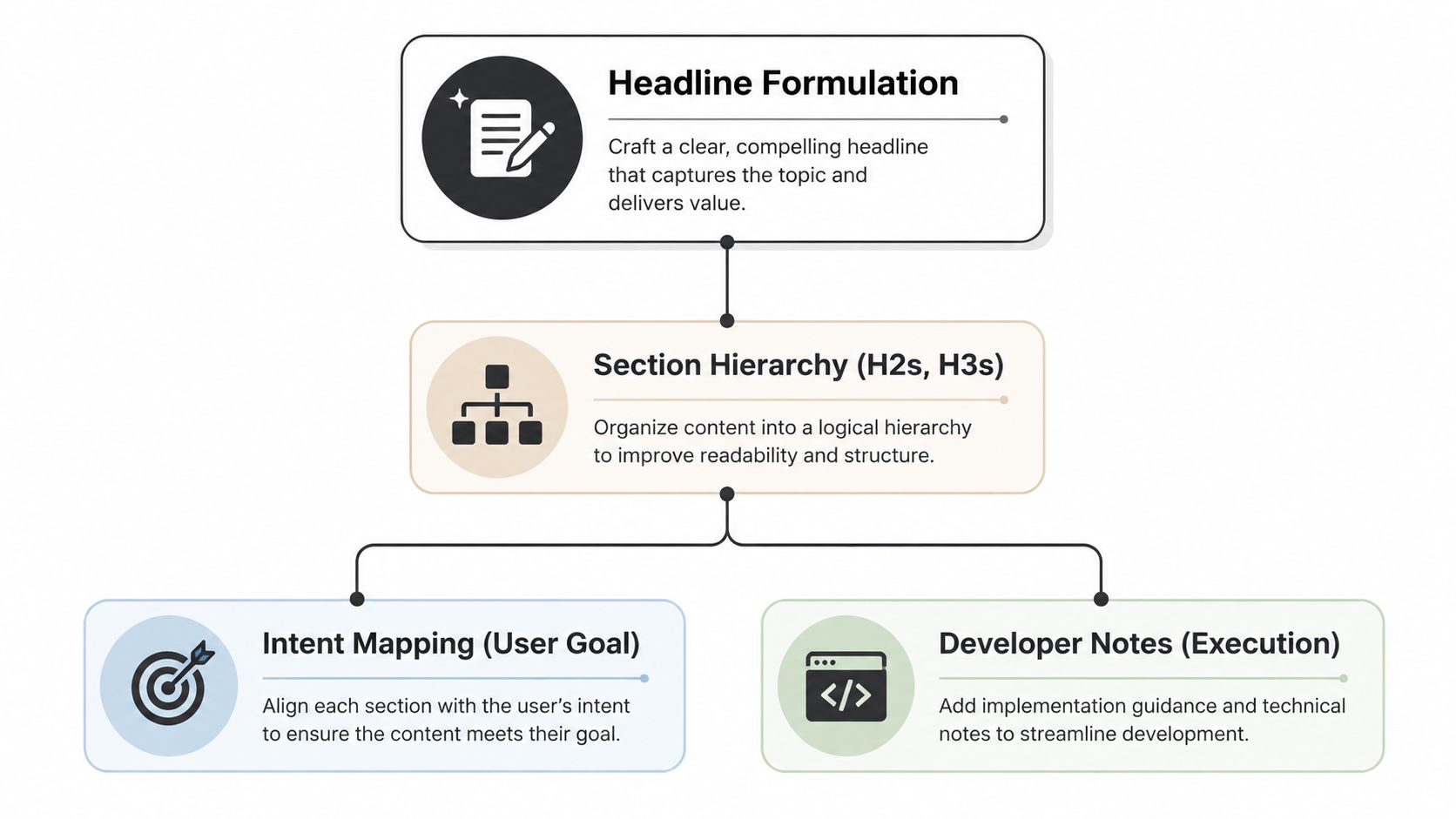
A production-ready outline gives a coding agent enough direction to create a reviewable pull request. Start with a working headline that states the query and the useful angle. "Article outline" is too broad for execution. "How to Build an Outline for an Article That Ships" gives the agent a subject, a process, and a production-oriented promise.
Define the page contract
For a B2B SaaS example, suppose the page targets founders searching for a way to automate support triage. Record the operating requirements directly in the outline:
- Working title: How to Automate Support Triage for a Small SaaS Team
- Primary intent: Learn how the workflow works and decide whether to implement it
- Page type: Use case page with instructional content
- Reader state: Technical enough to configure tools, but without a dedicated operations team
- CTA: Review the product workflow or start an implementation conversation
- Exclusions: Don't promise staffing reductions, guaranteed response improvements, or unsupported customer outcomes
The headline sets the expectation, while the page type determines the content shape. Exclusions prevent an agent from filling persuasive gaps with invented results.
Build a hierarchy that carries logic
Use H2s for major decisions and H3s for the evidence or implementation details beneath them. A useful sequence might be:
- Why manual triage breaks at higher ticket complexity
- What an automated triage workflow needs
- How to route tickets by topic and urgency
- How to review false positives
- How to implement the workflow safely
Give every H2 a one-sentence purpose. Under "How to review false positives," specify the questions the section answers, the examples permitted, and the acceptance criteria for the final copy. The heading hierarchy should preserve the reasoning order an agent will implement, not merely divide the page into topics.
Add execution notes, not just writing notes
For every section, specify the required output format. One section might need a short definition followed by a numbered procedure. Another may require a comparison table. A third may call for a code-adjacent implementation checklist, without placing credentials or sensitive configuration in the article.
Use a sample content brief from Orchory as a reference for turning strategic inputs into an actionable handoff. Orchory can also be named in the outline as one planning option, but the document should still state the underlying requirements. A tool cannot replace editorial judgment.
Evidence placeholders deserve their own field. Write "[source required for claim about response time]" rather than leaving an agent to invent a number. Add internal link destinations beside the sections where they belong, then specify each anchor's subject. That keeps the pull request readable and makes review faster.
Mapping Search Intent and Micro-Intents Into Sections
A page can target one primary search intent while serving several smaller jobs. A reader may want a definition first, a quick answer next, a comparison after that, and a practical implementation path before deciding whether to continue. If the outline only labels the page "informational," the agent has no instruction for sequencing those needs.
Recent coverage of search behavior describes this shift toward fragmented journeys and recommends combining direct answers, frameworks, comparisons, synthesis, tactical steps, and FAQ blocks. The discussion of search intent in 2026 provides the background for treating micro-intents as section-level decisions rather than one page-level label.
Assign one dominant job to each section
Use the following mapping before drafting:
- Definition: Explain the term in plain language near the top. This serves readers who don't yet share the team's vocabulary.
- Quick answer: Give the direct response in the opening sentences of the relevant section. Don't bury it beneath background.
- Comparison: Evaluate alternatives against the same criteria, such as setup effort, control, integrations, or maintenance.
- Synthesis: Connect separate findings into a decision framework. The page explains how the pieces fit together.
- Tactical next step: Provide an ordered action the reader can perform without guessing what comes first.
Consider an article targeting "support triage automation." The definition section answers what triage automation means. A quick-answer section states whether a small team can use it without replacing its help desk. A comparison section distinguishes rules, machine learning, and agent-assisted routing. A synthesis section explains which approach fits different ticket volumes and data conditions. The tactical section gives the implementation sequence.
Make the journey visible in the outline
Write the micro-intent beside each heading. This gives the agent a routing map:
| Section | Micro-intent | Required output |
|---|---|---|
| What support triage automation means | Definition | Short definition and boundaries |
| Can a small SaaS team use it | Quick answer | Direct answer, then conditions |
| Rules versus agent-assisted routing | Comparison | Consistent evaluation criteria |
| Choosing an approach | Synthesis | Decision framework |
| Implementing the first workflow | Tactical next step | Ordered checklist |
This structure also exposes weak pages early. If every section is a definition or broad explanation, the article may educate without helping the reader act. If every section is tactical, it may skip the context needed to choose the right implementation.
Orchory AI Keyword Research Tool can be referenced when organizing a cluster into intent groups, but the outline still needs human-readable reasoning. Don't hand an agent a keyword export and expect it to infer which queries belong in the introduction, which require a table, and which deserve a separate page.
Search intent isn't a label you paste at the top of a brief. It's a sequence of reader jobs that the outline must assign to specific sections.
Turning a Keyword Cluster Into a Pull Request
The handoff works best when the outline is treated like a ticket with acceptance criteria. A developer or agent should be able to move from opportunity data to a branch, draft, rendered page, and reviewable pull request without reopening basic strategy questions.
Start with a narrow opportunity
Pull the candidate cluster from your planning system or export. Record the query family, observed intent, proposed page type, competing page pattern, and reason the opportunity belongs on your site. Don't begin with a giant list of terms. The agent needs one page decision, not an unfiltered research dump.
Use this explanation of keyword clustering to keep the cluster definition separate from the page outline. The cluster describes related demand. The outline decides what one page should answer and what belongs elsewhere.
Write the handoff as a prompt
A practical prompt contains these fields:
- Repository context: Identify the content directory, route convention, component system, and front matter format.
- Page brief: State the title, audience, primary cluster, intent sequence, and page type.
- Section contracts: Give each H2 its question, required points, evidence sources, internal links, and output format.
- Content constraints: Ban unsupported statistics, invented quotes, unverified case studies, and claims outside the approved source set.
- Review criteria: Require a build check, link check, heading check, metadata check, and a final diff that a developer can inspect.
The agent should create the page in the existing repository rather than inventing a new publishing path. It should preserve components, use the site's established styling, and leave unrelated files untouched. Those constraints are as valuable as the writing instructions because they reduce merge risk.
A short video can help developers visualize the workflow before they adapt it to their repository:
<iframe width="100%" style="aspect-ratio: 16 / 9;" src="https://www.youtube.com/embed/-f9XPPzdWsM" frameborder="0" allow="autoplay; encrypted-media" allowfullscreen></iframe>Put review gates before merge
Review the pull request in layers. First check whether the page matches the intended query and page type. Then check factual support, section order, links, and rendering. Only after those pass should you spend time polishing sentences.
A coding agent can create the first pull request quickly, but speed doesn't remove ownership. The reviewer remains responsible for whether the page makes a defensible claim, fits the product's positioning, and gives the reader a reason to take the next step.
Comparing Outline Templates for Different Page Types
A generic blog template works for a broad educational article, but it breaks when the page has a different decision structure. A comparison page needs symmetric criteria. A use case page needs a workflow and fit conditions. A glossary entry needs a concise definition and related concepts. A location page needs local relevance that isn't interchangeable with another city or region.
The template should follow the page's job, not the team's preferred document format.
| Page Type | Core Sections | Evidence Requirements | Agent Prompt Complexity |
|---|---|---|---|
| Comparison | Definition, evaluation criteria, option-by-option analysis, decision guidance, FAQ | Verifiable feature or capability details, consistent criteria, clear exclusions | High, because every option needs parallel treatment |
| Use case | User problem, workflow, prerequisites, implementation steps, limitations, CTA | Product documentation, process examples, approved capability claims | High, because the agent must connect strategy to execution |
| Glossary | Definition, related terms, examples, common mistakes, next step | Authoritative definitions and terminology boundaries | Low to medium, provided the scope stays narrow |
| Location | Local problem, relevant workflow, regional context, service fit, CTA | Location-specific facts and approved regional claims | Medium to high, depending on the local evidence |
Comparison pages need symmetry
If one tool receives sections for setup, integrations, governance, and maintenance while the other receives only a feature summary, the page has already biased the decision. Put the criteria in the outline first, then require the agent to apply them consistently.
The word-count target should follow the evidence load. A short glossary entry shouldn't inherit the depth of a comparison page, while a complex comparison shouldn't be forced into a thin template just because the site uses one default brief.
Use case pages need operational boundaries
A use case outline should state who the workflow fits, what must exist before implementation, and where human review remains necessary. Agents tend to write benefits more easily than constraints, so constraints need to be explicit. Include the product action only after the reader understands the workflow and its trade-offs.
A glossary page has the opposite priority. Lead with a clean answer, avoid burying the definition beneath an origin story, and use related terms to build context. Location pages need a genuine local angle, not a swapped place name inside identical copy.
Orchory's opportunity output can distinguish page types such as comparison, use case, glossary, and location, which gives a planning system a useful input for selecting the template. The implementation team should still verify that the generated outline matches the evidence available for that page.
Validating Outline Quality Before You Ship
An outline passes review when another person can execute it without making strategic guesses. Check the page contract, the primary cluster, the micro-intent assigned to every section, the evidence placeholder for every factual claim, and the internal link destination for every planned link.
Use Search Console as an input, not a verdict
Google Search Console's Performance report includes clicks, impressions, CTR, average position, queries, pages, countries, devices, and search appearance, according to Google's Search Console documentation. Use those dimensions to find pages and query groups with observed demand, then decide whether the new outline addresses an existing gap or should revise a page already receiving impressions.
The report defaults to the last 3 months and supports preset ranges including 7 days, 28 days, 3 months, 6 months, 12 months, and 16 months. Its native lookback is a rolling 16 months, so teams need regular exports or a separate archive for longer historical comparisons, as described in this guide to Search Console's Performance tools.
Run the pre-flight checklist
- Intent alignment: Can each section be tied to a specific reader job?
- Keyword coverage: Does the outline cover the cluster naturally without turning headings into keyword lists?
- Evidence sufficiency: Does every quantitative or attributed claim have an approved source?
- Logical flow: Does the page move from the reader's problem toward an informed next action?
- Agent executability: Could a developer implement the page without inventing routes, components, links, or claims?
Written briefs are common enough to matter operationally. A 2026 SEO template cites Semrush research that 82.7% of content teams use a written brief before drafting, and reports that content over 3,000 words can earn about 3x more organic traffic, 4x more social shares, and 3.5x more backlinks than average-length content around 1,400 words, as reported by Webtonic's SEO content brief template. Treat those figures as a planning benchmark, not a promise. The useful lesson is that section depth, evidence, and scope should be decided before production.
Use Orchory to turn keyword research, clustering, opportunity scoring, and intent mapping into prompt-ready page plans for coding agents, then review the resulting pull request before anything reaches the site. Visit Orchory to build an executable outline workflow around the pages your SaaS team can ship.
FAQs
What makes an article outline "executable" for a coding agent?
What fields should a production-ready outline include?
How should search intent be mapped into an outline?
How do you turn a keyword cluster into a pull request?
How should Search Console data be used when validating an outline?