Why a Keyword Research Planner Is a Pipeline, Not a Spreadsheet
A keyword research planner only works when it ends in shipped pages. Here's the four-phase pipeline, scoring rubric, and weekly loop that gets there.

You're probably sitting on a half-finished SEO plan right now. A few keyword ideas live in a spreadsheet, some notes are in a doc, and the actual page work keeps getting pushed behind product tasks, bug fixes, and customer asks. That's the point where a keyword research planner stops being research and becomes scheduling noise.
A planner only earns its keep when it ends in shipped pages. The useful version takes messy inputs, turns them into a ranked queue, and hands that queue to whoever is opening pull requests, whether that's you, a developer, or a coding agent. Google Keyword Planner can help with discovery, but it's not the finish line, and Google's own docs frame it as a planning tool that gives monthly estimates, historical metrics, and competition data, not a content strategy by itself (Google Keyword Planner, Google Ads keyword planning support).
Why a Keyword Research Planner Is a Pipeline, Not a Spreadsheet
A founder doing SEO on weekends does not need more rows. They need fewer pages, chosen well, and a process that gets those pages into build without reopening the same debate every Monday. A keyword research planner only works when it behaves like an execution pipeline, it takes inputs, filters them, scores them, and ends in a pull request queue.
Google Keyword Planner is still widely used. An industry roundup says marketers spend a large share of their keyword research time inside it, while also noting that the tool can overstate search volume for many terms and miss the mark often enough that you should not treat its numbers as final truth. Google's own Keyword Planner is built for discovering new keywords and for getting search volume and forecasts, and Google Ads support explains how forecast data is meant to help planning, not replace judgment (Google Ads support). That context matters because a planner built around one export can look tidy while still sending bad pages into the queue.
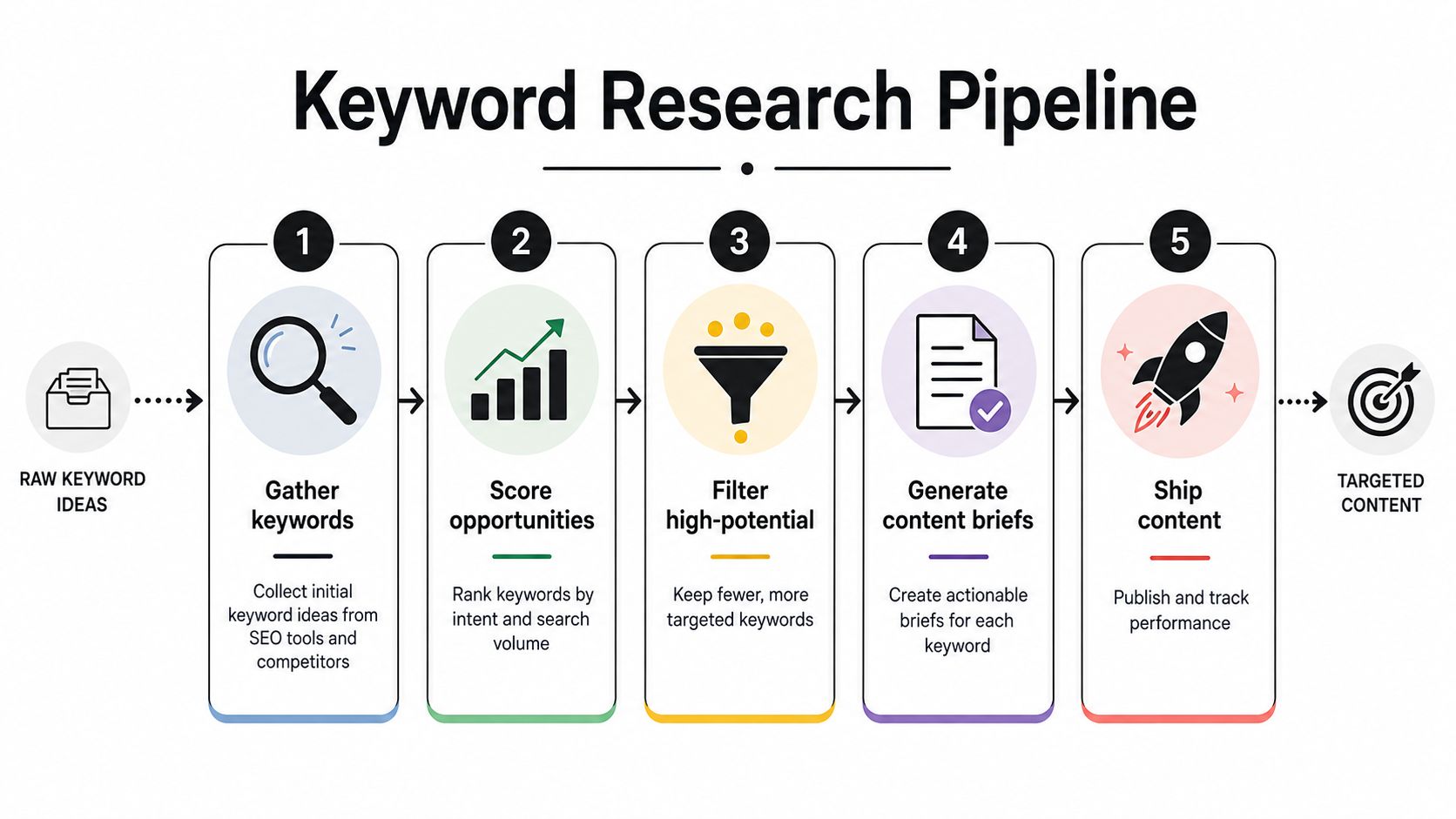
What the planner is for
A good planner makes decisions repeatable. It does not just collect terms, it decides which terms deserve a page, which ones should stay in the backlog, and which ones should never reach production. That matters for small teams, because the bottleneck is usually follow-through, not ideas.
Practical rule: if a keyword cannot survive validation, clustering, and scoring, it should not survive into a prompt.
The working model is simple. Expansion creates the candidate set. Validation checks whether the terms are real and timely. Clustering groups them by intent, and the internal mapping logic belongs in a separate SEO workflow such as keyword clustering. Scoring turns the pile into a queue that somebody can ship.
That is the point. The spreadsheet is an artifact. The pipeline is the product.
The Four Phases of a Working Planner
A working planner starts with expansion, but only as a way to build a candidate pool. Seed terms, Search Console queries, a page URL, or category inputs feed the first pass. The output should be messy on purpose, because a planner that looks finished too early usually missed something useful. It should produce enough options to sort, not a neat roadmap that pretends the search space is already understood.
Expansion, validation, clustering, scoring
The next phase is validation. Volume alone is a weak filter, and it is easy to let a spreadsheet reward ideas that sound popular but never show up in your own data. Start with current demand from Search Console, then check seasonality and intent with Trends and SERP question sources. A planner built this way uses observed demand first, then broadens outward, which keeps weak ideas out of the queue before anyone writes a brief.
Then clustering, or topic clustering, turns terms into pages. One primary keyword per URL, with a small set of supporting terms tied to the same page, keeps the site from splitting intent across multiple drafts and competing with itself. The mapping belongs in the planner, not in a pasted export, because the export only records the list while the planner decides what belongs together. If you need the fuller logic behind that grouping step, the internal guide on keyword clustering is the right reference.
The last phase is scoring, and many teams either overcomplicate the model or skip it entirely. Good scoring does not produce "interesting keywords," it produces a short, defensible queue with page type, intent label, and a next action that a writer or coding agent can use without extra translation. That queue should be ready to hand off through pull requests, because the planner's job is to move pages toward shipping, not to generate another report that sits untouched.
A Monday loop can stay simple:
- Pull current queries from Search Console.
- Expand the seed list with adjacent terms.
- Validate demand and intent with Trends and SERP checks.
- Cluster by topic and page type.
- Score the surviving opportunities and send the best ones into the build queue.
A B2B SaaS team might start with five terms such as onboarding software, customer onboarding checklist, onboarding email template, product adoption, and user activation. After clustering and scoring, that often turns into three real page opportunities instead of five. That difference matters. Fewer rows mean less noise, clearer briefs, and a cleaner handoff to the agent or developer who is shipping the page.
Picking the Right Data Sources for Each Phase
A planner is only as honest as its inputs. For a small team, the decision is less about whether to use Google Keyword Planner and more about where it fits, what it can tell you, and where it will mislead you if you treat it like a content-gap detector.
| Source | Best Phase | Strength | Known Limit |
|---|---|---|---|
| Google Search Console | Validation | Real demand from your own site | Only shows what you've already earned |
| Google Keyword Planner | Expansion | Broad idea generation and campaign-style estimates | Broad volume ranges, and overestimation is common |
| Paid third-party APIs | Scoring | More stable volume and competitive data | Adds cost and still needs judgment |
Search Console is the cleanest signal because it shows queries tied to your own site. If users already search for a term and you have impressions, the topic is real, not theoretical. That makes it the best place to validate whether a page deserves to exist at all.
Google Keyword Planner belongs earlier in the loop. It helps with adjacent discovery, broadening seeds, and checking how Google frames keyword ideas under specific filters. The trade-off is that its numbers are estimates, so the output is useful for direction, not for pretending you have exact demand. Use it for expansion, then verify the strongest candidates elsewhere.
Paid APIs are what you reach for when Planner's volume ranges are too loose to score with confidence. They are not magic. They just give you cleaner inputs for the scoring step, which is enough when the goal is to ship pages instead of debating the sheet.
If you have to choose quickly, use this rule of thumb. Search Console for what users already want from you, Keyword Planner for nearby discovery, and a paid source when you need tighter score confidence. Anything else is usually over-engineering or wishful thinking.
A Scoring Rubric You Can Defend to a Co-founder
Most keyword plans die here because scoring feels subjective. A founder looks at the sheet, sees a pile of decent ideas, and asks which one deserves a sprint. The answer needs to be boring, defensible, and fast enough to explain in a ten-minute meeting.
The rubric
Score each opportunity on three inputs, each from 1 to 3.
- Demand signal, how much evidence you have that people search for it.
- Intent match, how closely the query matches the page you'd build.
- Ability to outrank, whether your site can realistically compete with what's already ranking.
Then apply three modifiers.
- Page type fit, whether the keyword belongs on a comparison page, glossary entry, use case page, or something else.
- Seasonality, whether timing makes this term better or worse right now.
- Cannibalization risk, whether another URL on your site already covers the same intent.
Keep anything below threshold out of the prompt queue. If a term isn't worth a build, it's not worth an agent prompt.
A practical threshold is simple. Build when the total score clears your bar, watch when it's borderline, skip when it falls short. The actual number matters less than being consistent. What you don't want is a planner that promotes low-value ideas because they look impressive in a sheet.
A worked example
Take three phrases in the same cluster, such as onboarding software, onboarding tool, and customer onboarding checklist. A comparison page can score high on intent match for the first two because the SERP usually expects software evaluation. A glossary entry can score lower, even if the demand exists, because the page type fit is wrong.
The third phrase may be better as a checklist or template page. Same cluster, different URL decision. That's the part founders usually miss. The query might be valid, but the page type can still be a mismatch.
The rule is blunt on purpose. If an opportunity doesn't clear your threshold, it never reaches the prompt stage. That one guardrail keeps the queue from filling up with content that looks productive and never moves the business.
From Scored Opportunity to Coding Agent Prompt
A spreadsheet row is just data. A prompt is an instruction a coding agent can execute. That handoff is coding agent SEO in practice: once a keyword clears scoring, the next job is turning it into something Claude Code or Cursor can use without a call, a Slack thread, or a long content brief.
Start with the fields a coder needs. Put the target keyword first, then the secondary terms, intent, page type, internal links to add, and the outline beats that define the page. Leave any of those out and the agent starts guessing. Guessing is how SEO pages drift away from the search intent they were meant to match.
Keep the prompt short and structured. It should say what page to create, what existing pages to link to, what sections to include, and what to leave unchanged. That format gets read as a pull request instead of a brainstorming note.
A usable template looks like this:
- Target keyword: onboarding software
- Secondary terms: customer onboarding, onboarding platform, product adoption
- Intent: commercial investigation
- Page type: comparison page
- Internal links to add: pricing, product tour, implementation guide
- Outline beats: intro, comparison criteria, feature matrix, implementation notes, FAQ
That shape works in Claude Code, Cursor, and Codex because it maps to repo work instead of abstract planning. It also fits the structured instruction flow described in Orchory's AI SEO agent workflow, where planner output becomes the build task a coding agent opens against the repo.
The media matters here because planning turns into code at this stage. Use the prompt format to cut ambiguity, then hand it to the agent as a build task, not a brainstorming exercise.

A good handoff produces a PR you can review, not another meeting. That is the operating model that keeps a keyword research planner tied to shipping pages instead of reporting on them.
<iframe width="100%" style="aspect-ratio: 16 / 9;" src="https://www.youtube.com/embed/5fhcklZe-qE" frameborder="0" allow="autoplay; encrypted-media" allowfullscreen></iframe>Running the Planner Weekly and Shipping the Queue
A planner is a habit, not a setup. If the team only touches it when traffic dips, the queue gets stale and the rankings drift away from what the product is shipping. The fix is a simple cadence that keeps the pipeline alive without turning it into a full-time job.
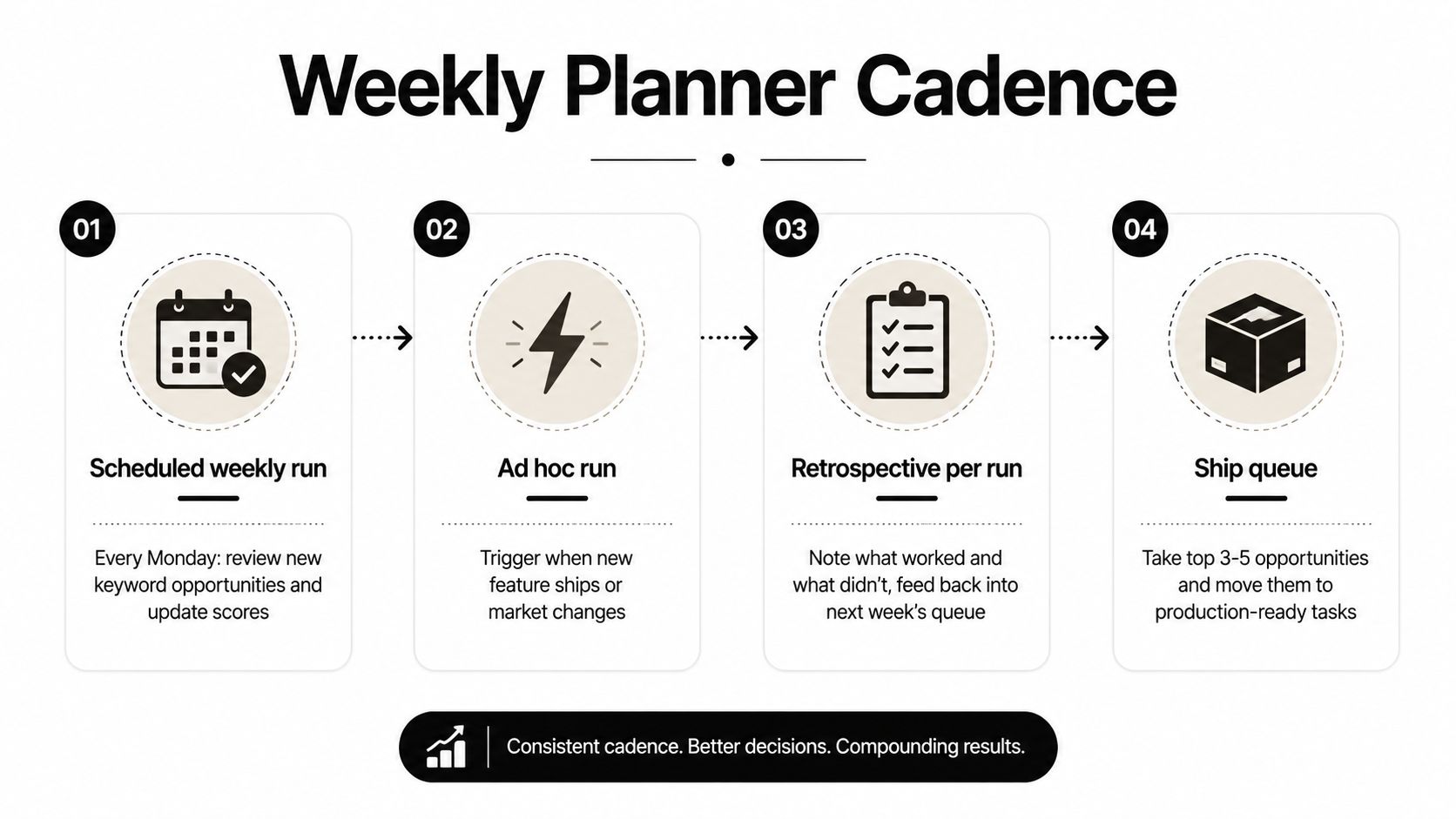
The weekly loop
Run the planner once a week on a set day. Monday works because it gives the team a fresh queue before writing starts. Add an ad hoc run when a new feature ships, when a market opens, or when your product changes enough that the old clusters no longer match buyer intent.
Keep the export clean. The CSV should preserve the target keyword, cluster, intent, page type, score, and action status. Archive what you skipped, because skipped items are useful next month when a related feature launches and the same term becomes relevant.
For queue size, keep it manageable. A backlog of 50 "opportunities" usually means nothing is getting built. A short list of 10 to 15 active opportunities is easier to review, easier to assign, and easier to ship.
Review rule: nothing goes to production without a human PR review, even if a coding agent drafted the page.
That keeps control with the team, which matters more than automation theater. It also makes the planner budget predictable. Orchory Pro is $990/month for one plan, which is a concrete way to think about the cost of an executing planner rather than another dashboard.
The retrospective
After every run, spend 15 minutes on the retrospective. Write down which clusters were too broad, which prompts were too vague, and which pages looked strong in planning but weak in execution. Then update the seed list and tweak one scoring weight in the same CSV you already export.
That small feedback loop is what keeps the planner from drifting. The queue stays close to the product, and the product stays close to the queue.
Three Traps That Kill a Planner After Month Two
The first trap is overproducing thin clusters. The planner looks busy, the sheet gets longer, and the team feels productive, but the page ideas are too similar to justify separate URLs. That's how you end up with a content graveyard and a pile of cannibalizing pages. The fix is to stop at one page per topic and reject clusters that can't stand on their own.
The second trap is trusting Keyword Planner's volume range as gospel. It's a useful discovery tool, but it isn't a completeness analyzer or a content-gap detector. If you skip manual SERP inspection, you'll keep promoting "opportunities" that are commercially irrelevant or already crowded by stronger pages. Check the results before you build.
The third trap is never feeding the retrospective back into the seeds. The queue slowly drifts away from the product, especially after roadmap changes or new positioning. A 15-minute run review, written into the same CSV, keeps the planner honest and lets you adjust one scoring weight instead of rebuilding the whole system.
If you want the habit that separates planners that die after two months from planners that run for years, it's that retrospective. Keep the run cadence fixed, keep the prompt fields structured, keep PR review mandatory, and trigger the retrospective every time you ship the queue.
If you want a planner that ends in a ranked queue, prompt-ready briefs, and pull requests your team still controls, look at Orchory. It's built for the handoff layer, so you can stop treating keyword research like a spreadsheet and start treating it like a shipping pipeline.
FAQs
What makes a keyword research planner different from a keyword spreadsheet?
Is Google Keyword Planner enough on its own for a content strategy?
What are the four phases of a working keyword planner?
How do you score keyword opportunities so the decision is defensible?
How often should a team run the keyword planner?