Keyword Research for SaaS: From Spreadsheet to Shipped Pages
Why SaaS keyword research fails without a build pipeline, and how to turn queries into scoped pages developers and coding agents can ship.
You've probably run into the same problem I've seen on more than one SaaS team: a pile of keyword ideas in a spreadsheet, a backlog full of product work, and no clear path from research to something that ships. The gap isn't the research. It's the handoff. If keyword work never turns into a page, a PR, or a measurable change in search visibility, it's just another document your team opens once and forgets.
Keyword research for SaaS only starts paying off when it behaves like a build pipeline. The point isn't to collect phrases, it's to identify pages worth shipping, give them a clear intent, and turn them into work a developer or coding agent can execute without another round of vague strategy meetings. That's the difference between SEO as theory and SEO as output.
Why Most SaaS Keyword Research Fails Bootstrapped Teams
Most SEO advice assumes you've got a content manager, a strategist, and time to burn inside Ahrefs all week. If you're a founder, a product engineer, or the person who also owns growth, that model breaks immediately. You're reviewing PRs, fixing bugs, and shipping features, so a keyword list that never becomes code is dead weight. The Ahrefs research suite vs PR handoff comparison makes that workflow trade-off explicit.
The common failure mode is simple. Someone brainstorms topics, exports a sheet, sorts by volume, and hands the list to a writer. That works only if your team already has a machine for brief creation, page production, and review. Without that machine, the research phase becomes a parking lot for ideas instead of a source of shipped pages.
The real bottleneck is not discovery
The bottleneck is execution. Search Console, keyword tools, and competitive research all create plenty of inputs, but bootstrapped teams usually stall when they need to decide what page to build, who owns it, and how fast it can go live. A keyword can look promising and still die because nobody translated it into a scoped task.
That's why a search-data-first workflow matters. Google Search Console exposes the queries already generating impressions, clicks, CTR, and average position, so you can spot “hidden” terms touching the site before you write something new. That first-party data is the shortest path to early wins, because you're working from queries that already have some evidence of demand. The search-data-first approach and its role in modern SaaS keyword workflows are outlined here.
Practical rule: if a keyword process doesn't end with a page type, an owner, and a pull request, it's not a process. It's a note.
Static spreadsheets don't ship anything
A spreadsheet can help you rank ideas, but it can't generate a build task by itself. That's the handoff problem. The fastest teams I've seen treat keyword research like product work: they validate a page idea, map it to intent, and then turn it into a spec that a coding agent or developer can execute.
Broad brainstorming tends to waste time for the same reason. It produces topics, not opportunities. SaaS SEO gets easier when you stop asking, “What should we write about?” and start asking, “What page should we ship next, and what search intent will it satisfy?”
Mining Internal Data for High-Intent Seeds
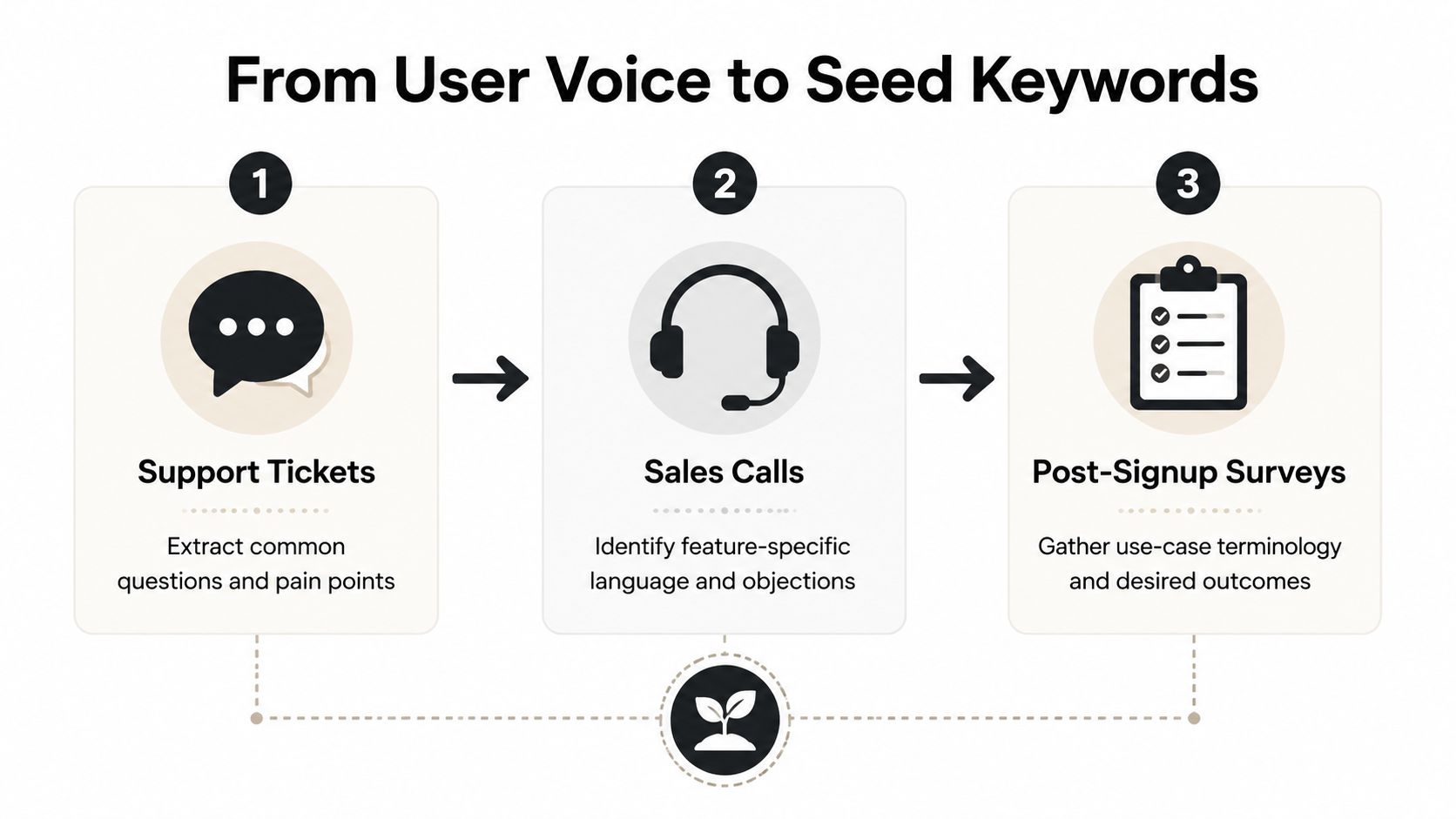
The best seed terms are already sitting inside your product and support workflow. Customers tell you what they call the problem in tickets, sales calls, onboarding chats, and post-signup surveys. That language is usually sharper than the phrasing you'd invent from the outside, and it often maps to intent that keyword tools miss.
Start where users are already complaining
Support tickets are the easiest place to begin. Look for repeated questions, recurring blockers, and the exact words people use when they describe friction. If three different users ask for the same workaround, that wording is a candidate seed because it's grounded in a real task, not a marketing phrase.
Sales calls are the second source. The objection language matters as much as feature requests, because it shows what people compare before they buy. If prospects keep asking whether your product fits a specific workflow, that workflow phrase belongs in your seed list.
A practical starting point is a seed list of 20 to 50 core keywords split across buyer stages, then mapped to page types like blog posts, landing pages, and pricing pages. That range gives you enough coverage to find patterns without drowning in noise, and it lines up with the planning approach recommended for SaaS keyword work. A 2026 guide recommends building a 20 to 50 keyword seed list and prioritizing bottom-funnel terms first.
Use post-signup language, not just top-of-funnel phrasing
Post-signup surveys catch the words users use after they've already committed. That matters because the language becomes more concrete once somebody is trying to use the product. You'll see use cases, desired outcomes, and feature-level vocabulary that never shows up in generic category terms.
Internal data also helps you avoid a common SaaS mistake, over-indexing on brand-neutral, educational phrases that sound safe but don't convert. Multiple SaaS keyword guides recommend mining customer interviews, support conversations, reviews, job listings, and sales calls because these sources reveal the pain vocabulary buyers already use. That's the vocabulary you want to turn into pages, not the polished language from a brainstorm. That customer-language approach is discussed here.
If you use Orchory, the Orchory AI Keyword Research Tool fits naturally into this step because it's built to turn research inputs into a ranked opportunity queue rather than leaving them as raw notes. Keep the raw language, then strip out duplicates, merge obvious variants, and keep the phrasing closest to how a buyer would search.
A simple extraction rule
- Support tickets: pull repeated problem statements and the nouns people attach to them.
- Sales calls: capture objections, comparison language, and implementation questions.
- Surveys: preserve use-case phrasing and desired outcomes exactly as written.
- Reviews and job posts: mine process language that describes how teams already work.
If your seed list sounds like a marketing homepage, you waited too long to start collecting it.
Validating Opportunities Beyond Search Volume
Search volume matters, but it's not the first filter. A keyword with broad demand and weak intent can waste a month of production time, while a much smaller term can produce the exact kind of traffic you want. For SaaS, business fit outranks raw volume because the wrong clicks don't help pipeline.
Score for fit first, then for difficulty
A practical SaaS scoring model should prioritize product fit, ICP fit, intent strength, conversion potential, and ranking feasibility. That means you're asking whether the term describes a problem your product solves, whether the searcher looks like your buyer, and whether your site can realistically compete for the SERP. One guide frames this directly, product and solution pages should target commercial and transactional intent, even when volume is lower than broad informational terms. That prioritization is laid out here.
Difficulty deserves a reality check too. Ahrefs-style keyword difficulty is commonly reported on a 0 to 100 scale, and SaaS guidance often treats terms under KD 15 as relatively easier while KD 80+ is much harder without a strong backlink profile. Some practitioners also use a minimum threshold of 10 searches per month when building an opportunity set, which shows the bias toward attainable, intent-rich terms. Those common thresholds are summarized here.
| SaaS Keyword Scoring Matrix | Low Priority | High Priority |
|---|---|---|
| Product fit | The term is adjacent to your offer or only loosely connected | The term matches a core feature, workflow, or use case |
| ICP fit | Searcher could be anyone, including students or hobbyists | Searcher looks like a buyer, evaluator, or active user |
| Intent strength | Informational curiosity with no buying signal | Commercial, transactional, or problem-solving intent |
| Ranking feasibility | SERP is dominated by major authorities or weakly matchable formats | SERP has openings and your site can match the page type |
| Business impact | Traffic would be broad but unlikely to convert | Traffic would be smaller but much more likely to create pipeline |
Stop treating volume as the goal
The biggest mistake is confusing “searches” with “opportunity.” A broad keyword can bring attention and still fail to create useful visits. A narrower term can earn fewer clicks and still outperform because the reader already has a clear problem and a shorter path to signup.
Practical rule: if you can't explain how a keyword maps to revenue, it doesn't belong in the build queue yet.
Forecasting helps here too. A practical workflow records search volume and clicks, then models sign-ups, customers, and revenue by keyword category. That turns research into planning instead of guesswork. The spreadsheet-based forecasting workflow is described here.
Clustering Intent and Mapping Page Types
Once the list is validated, the next mistake is to treat every keyword like a separate blog post. That creates a pile of disconnected pages that don't support each other. Clustering fixes that by grouping related terms around one dominant intent and assigning each cluster a page type that can satisfy the SERP.
Map the intent before you map the URL
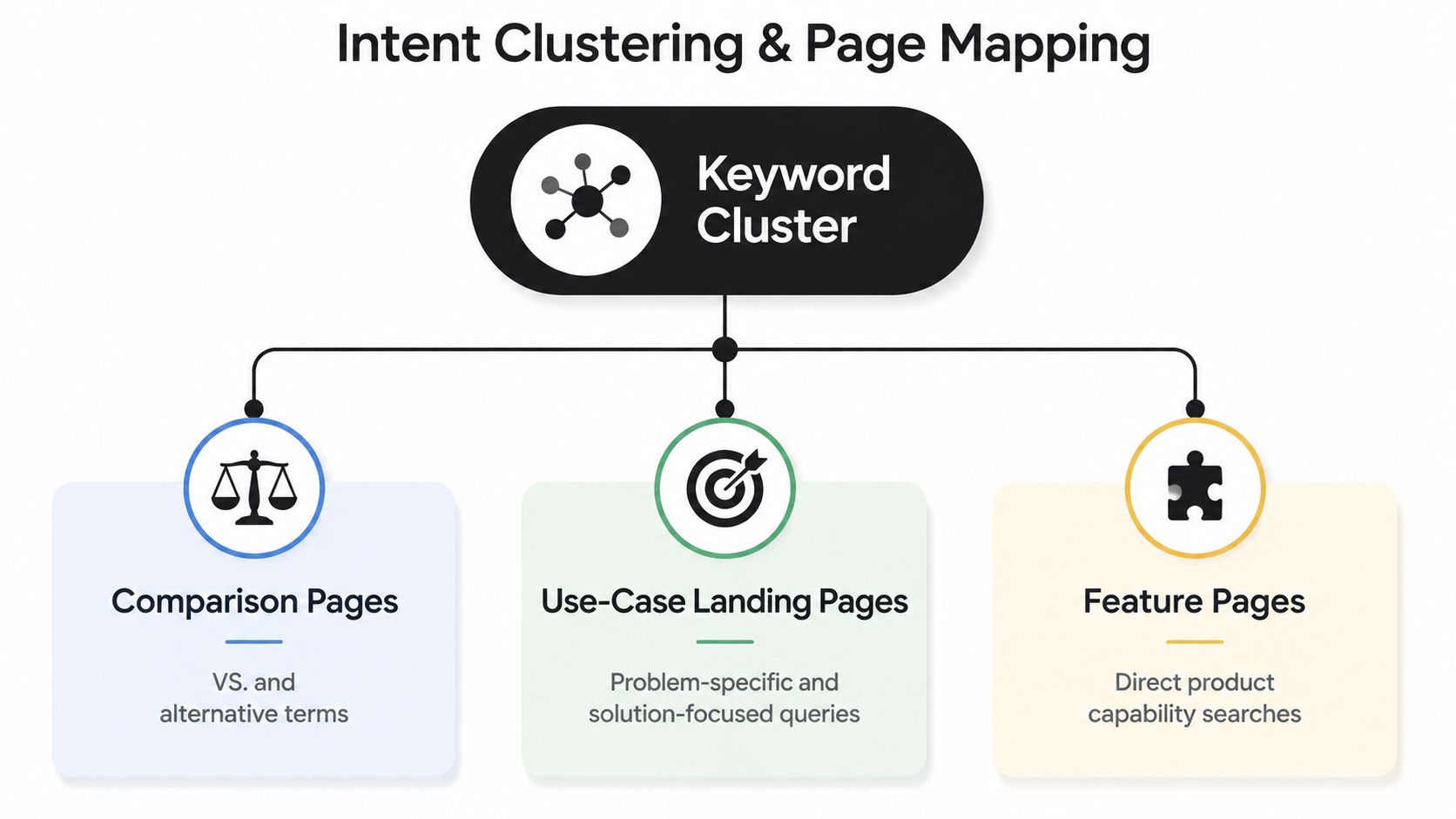
Start with the question, “What is the searcher trying to do right now?” If they're comparing vendors, that's a comparison page. If they're trying to solve a specific workflow problem, that's a use-case landing page. If they're looking for a capability your product exposes directly, that belongs on a feature page.
The page type matters because it tells your developer or coding agent what to build. A comparison page needs competitor names, structured differences, and decision support. A use-case page needs problem framing, workflow language, and product fit. A feature page needs implementation detail and a narrow promise.
The internal logic of clustering is covered well in Orchory's guide to keyword clustering, but the practical takeaway is simple, one cluster, one dominant intent, one primary page type. If two intents compete inside the same cluster, split them. Mixed intent pages usually underperform because they try to satisfy two different jobs with one URL.
Use the SERP as the final check
The SERP tells you whether your cluster is structurally sound. If the top results are listicles, you probably need comparison content. If they're product pages, a landing page or feature page is more likely to fit. If they're glossary-style results, a definition page may be the correct entry point.
A useful habit is to write the cluster name in plain English before you assign the page. “Customer onboarding checklist” is more useful than “onboarding.” “Alternatives to X” is more useful than “competitor terms.” Clear names make handoff easier, because the person building the page can infer scope without guessing.
The Handoff From Research to Pull Request
Most SaaS keyword work dies here, because the research output never becomes a task that a coding agent or developer can execute. A spreadsheet says “comparison page,” but it doesn't tell Cursor or Claude Code what sections to create, what components to update, or what copy blocks should be included. The solution is to translate the cluster into a prompt, not a memo.
Turn one opportunity into one build brief
A good build brief should include the target keyword, the dominant intent, the page type, the supporting subtopics, and the acceptance criteria. That's enough for a coding agent to create a first pass without inventing strategy on the fly. It also gives your team a clean review surface in the pull request.
If you're using an agentic workflow, the prompt should read like a scoped task. Tell it what page to create, what internal links to preserve, and what sections must exist based on intent. Then let the agent open the PR and let your team review the output like any other code change.
Orchory's AI Brand Visibility can sit in that workflow as a planning layer that helps surface where a brand has room to show up across search and AI-driven surfaces, but the important part is still the same, research becomes a prompt, and the prompt becomes a pull request. The broader agent-based handoff pattern is described here.
Keep production control with the team
The point of this model isn't to let software publish blindly. It's to reduce the gap between keyword validation and implementation while keeping review in your hands. Nothing touches the site until someone approves the PR, which is exactly what a small team needs when trust and speed both matter.
A keyword process is useful only when it can survive code review.
For technical teams, that's the biggest advantage. You're not asking a writer to guess at structure, and you're not asking a founder to re-explain the same page idea three times. You're handing the build system enough context to produce something reviewable, then using PR review to keep quality under control.
Measuring Impact and Iterating the Pipeline
Search Console is the feedback loop. If a shipped page starts getting impressions but the CTR stays weak, the title and snippet need work. If average position improves but clicks don't follow, the page may be matching the query poorly or the SERP may be pushing attention elsewhere. The point is to feed that data back into the next research run, not just stare at a monthly report.
Use shipped pages to improve the next batch
The fastest weekly routine is straightforward. Check the pages you already shipped, identify queries already appearing in Search Console, and pull out the terms with low CTR or rising impressions. Those are the “hidden” opportunities that can seed the next round of clusters, headers, or new page variants.
That loop matters because keyword research isn't a one-time planning event. It's a repeatable pipeline that should keep updating based on what the market clicks. In SaaS, the team that watches query data every week gets a much cleaner view of what to build next than the team that only reviews rankings once a month.
Treat SEO like a build system
A strong keyword pipeline behaves a lot like CI/CD. Research feeds validation, validation feeds clustering, clustering feeds page generation, and shipped pages feed performance data back into the model. If one step breaks, the loop slows down. If the loop works, each round produces a better queue than the last.
The handoff model pays off here too. If a page can be converted into a prompt, then your research doesn't sit idle waiting for a strategist to rewrite it. It moves forward, gets reviewed, and creates real search assets faster.
If you want keyword research for SaaS that ends in actual pages instead of another spreadsheet, use Orchory to turn query data, clustering, and scoring into ready-to-run prompts for coding agents. Visit Orchory and see how the workflow fits into your existing repo, so your team can ship reviewed pull requests instead of stalled SEO notes.
FAQs
Why does SaaS keyword research usually fail for bootstrapped teams?
Where should SaaS teams look for high-intent keyword seeds?
Should SaaS teams prioritize search volume when validating keywords?
What should a keyword cluster map to before it becomes a page?
What should a build brief include to hand keyword research to a developer or coding agent?