10 Blog Topic Ideas That Actually Ship: A SaaS Content Strategy Playbook
A developer-focused playbook of 10 blog topic ideas covering keyword research, intent mapping, scoring, comparisons, hubs, and quick wins.
Stop collecting unranked blog topic ideas. A spreadsheet full of possible subjects isn't a content strategy, it's a backlog nobody can defend when engineering time is scarce. A useful topic earns a place in the queue only when its search intent, page format, audience fit, business value, and production path are clear.
That standard matters because the web already contains more than 600 million active blogs, around 7.5 million new blog posts are published every day, and approximately 70 million WordPress posts are created each month. These blogging-volume estimates explain why a broad idea such as “API security tips” is rarely enough. You need to know which audience is searching, what result Google favors, what page you can build credibly, and where that page leads the reader next.
The ten blog topic ideas below are organized by intent and production format. They cover research pipelines, intent mapping, opportunity scoring, comparisons, seasonal pages, cannibalization fixes, content hubs, measurement, and quick wins. Each one includes a runnable workflow for a SaaS founder or developer team, including keyword validation, page scoping, internal linking, and a coding-agent handoff that ends in a reviewed pull request.
Orchory can fit into that workflow as an optional planning layer. It turns prioritized opportunities into agent-ready prompts, while your team keeps control of implementation through branch review and pull-request approval. The point isn't to publish more ideas. It's to ship the right pages in the right order.
1. How to Build a Keyword Research Pipeline That Actually Ships Content
Raw keyword exports don't become growth by themselves. A B2B SaaS team needs a repeatable pipeline that turns market language into a ranked queue of pages, then connects each page to a production brief and a measurable business outcome.
Start with a concise business profile. Define the product category, target customer, positioning, major use cases, competitors, and the action you want an organic visitor to take. A short profile is more useful than a long narrative because the pipeline can expand it into query candidates, related entities, and page formats.
For example, a platform such as Orchory might discover comparison queries including “Orchory vs. Semrush” and “Orchory vs. Ahrefs.” Those queries shouldn't become generic articles. Validate the result pages, group queries with overlapping intent, and assign each cluster to a structured comparison template with a product matrix, audience fit, limitations, alternatives, and links to relevant use cases.
Turn research into a queue
A practical weekly run should produce:
- Expanded queries: Include category, use-case, competitor, glossary, and problem-solution terms.
- Validated clusters: Group terms by shared SERP results, not by similar wording.
- Page assignments: Label each opportunity as a comparison, guide, use case, glossary entry, or another suitable format.
- Agent prompts: Include the target cluster, page type, outline, metadata, internal-link targets, and acceptance criteria.
An indie developer can run the same process to find long-tail use-case queries, then batch related opportunities into a thematic cluster. A bootstrapped fintech startup can export weekly opportunities to CSV, track which clusters produce customers, and feed that signal into the next ranking run.
This guide to keyword research planning is useful when you need to define the research-to-page workflow. The Orchory AI Keyword Research Tool can also be mentioned in a tool inventory without changing your production process.
Review the queue weekly. Merge high-confidence pull requests promptly, archive completed work, and trigger on-demand runs when you're testing a new segment or product line instead of waiting for the normal cycle.

2. Search Intent Mapping for SaaS
Search intent should determine the page you build, not the keyword label. Before assigning a topic, inspect the first three to five ranking pages and record what each result helps the searcher do. The practical clustering guidance from SE Ranking recommends grouping terms by shared SERP results rather than similar wording. Repeated overlap suggests one cluster, while different result types may require separate pages.
For “Kubernetes secrets management,” results centered on architecture, implementation, and security education support a technical guide. A DevOps SaaS can later publish a comparison page for solution selection, but leading with a product comparison would conflict with the dominant intent.
Assign the page format before drafting
Map “GDPR data retention” to an informational explainer covering definitions, policies, retention schedules, and implementation questions. “GDPR data retention tools” signals evaluation, so scope a comparison or product-selection page instead. The query family is related, but the visitor's next action differs.
Validate the assignment with a short workflow:
- Classify the SERP: Mark whether results favor guides, comparisons, definitions, documentation, or product pages.
- Extract supporting questions: Review People Also Ask results. Add closely related questions to the guide, or split them into another page when they represent a separate task.
- Check commercial wording: “Tools,” “software,” “alternative,” and “vs.” often indicate evaluation. Confirm the pattern by checking the actual results.
- Define the scope: Write one sentence stating the page's job, audience, and expected next action.
- Plan connections: Link educational pages to relevant comparisons, use cases, or product pages, and link back when the relationship helps the reader choose.
An analytics startup could separate “cohort analysis” into a definition page and a tool-comparison page. The first explains the concept and common workflow, then sends readers to the comparison. The second covers implementation choices and product fit. Validate each cluster before drafting, assign the outline and internal-link targets, then hand the page specification to a coding agent for a reviewed pull request.
If the dominant results favor another format, change the format or choose a different query. Adding more words will not correct an intent mismatch.
3. Ranking SEO Opportunities Beyond Search Volume
Search volume can misrank the queue. A developer tools company may gain more from an API authentication comparison than from a broad API security guide, even when the guide attracts more searches. The comparison serves visitors choosing a solution, while the guide serves readers learning a concept.
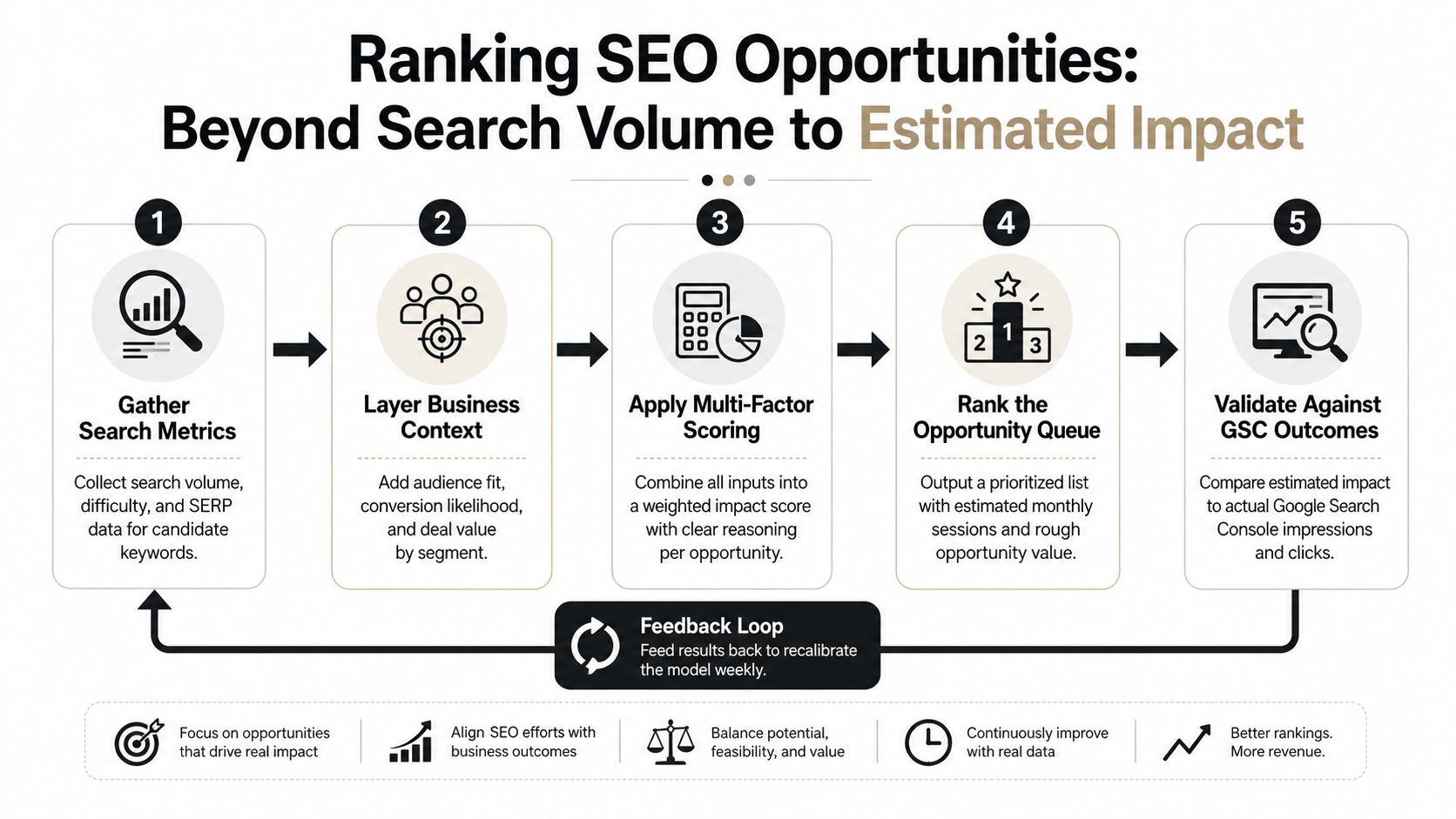
Score each opportunity against the work it needs to do. Use normalized volume, difficulty, audience fit, intent fit, SERP format, current ranking position, and a conversion proxy. One published topic-cluster playbook describes a weighted priority model that places intent and conversion fit alongside volume and difficulty.
Start with volume, difficulty, and audience fit. Add conversion data after enough performance history exists to make the signal useful, rather than letting one unusual conversion reshape the queue. Then validate the result against the SERP and define the page format, such as a guide, comparison, glossary entry, or product page.
Make business context visible
A staffing platform could rank hire [role] in [city] pages above broad role guides because location-specific searchers are closer to an active hiring decision. An accounting software startup might prioritize payroll tax deductions over how to calculate payroll tax when the narrower query matches its product and customer workflow.
Store these fields for every opportunity:
- Audience: Which customer segment has the problem?
- Intent: Is the visitor learning, comparing, selecting, or navigating?
- Page type: Which format satisfies that intent?
- Business action: What should the visitor do after reading?
- Estimated impact: What visibility, click, or conversion outcome justifies the work?
- Confidence: How strong is the evidence from the SERP and current performance?
Use the fields to scope the page, assign internal-link targets, and prepare a brief for a coding agent. The brief should specify the query cluster, page format, outline, metadata, canonical URL, links, and review criteria so the resulting pull request can be checked against both search intent and business purpose.
Review the scoring model quarterly. Compare estimated impact with actual Google Search Console impressions, clicks, and average position. GSC defines impressions as appearances of a site link in Google, clicks as selections of that link, and average position as the topmost position occupied by a property averaged across queries. These definitions provide a consistent page-level measurement base.
Test title and meta-description changes separately from major content rewrites when possible. If a page earns visibility but few clicks, investigate the snippet before rebuilding the content.
4. From Keyword Research to Pull Request
SEO research often stalls at the handoff. A brief saying “write a post about API authentication” leaves developers without implementation details and writers without enough product context to build a useful page.
Attach a structured brief to each page opportunity. Specify the target query cluster, search intent, audience, page format, proposed title, outline, entities, metadata, canonical URL, internal-link targets, and review criteria. Include the current ranking position and estimated impact so reviewers understand why the work belongs in the queue.
Use page-type templates
Build separate templates for comparison pages, use-case guides, glossary entries, and technical tutorials. A comparison template can require a maintained matrix, direct product assessments, limitations, alternatives, and links to product and implementation pages. A glossary template should define the term quickly, explain related concepts, and direct readers to deeper guides.
A B2B SaaS research team could run Orchory weekly, export high-priority opportunities with their prompts, and have a coding agent scaffold draft pull requests on a fixed schedule. An indie hacker could use a Cursor-integrated prompt to create a comparison markdown file with the outline, metadata, and internal-link targets. A growth team could batch several opportunities into one draft PR, then assign a writer to check facts, examples, and product fit.
Use a feature branch and draft PR. Apply the same checks to every submission:
- Intent alignment: Does the page answer the need shown by the SERP?
- Scope control: Does it stay within the assigned query cluster?
- Internal links: Do links point to relevant existing pages and planned spokes?
- Metadata: Are title, description, canonical, and structured data fields complete?
- Technical quality: Does the implementation pass repository checks and render correctly?
This overview of an AI SEO agent workflow describes the strategy-to-agent handoff. A team member should review every generated change before merging. Archive merged PRs and connect them to later performance results, so future briefs reflect which formats and intents produced useful outcomes.
5. Content Cannibalization and Competing Pages
A SaaS team can create competing pages without targeting the same exact keyword. A project management product might publish a feature page for “task dependencies” and a best-practices guide for the same workflow. If both pages answer the same SERP intent, Google receives no clear primary result.
Start with a keyword-to-page audit. Export queries and landing pages from GSC, group terms by shared intent, and flag clusters mapped to multiple URLs. The practical rule is simple: one search intent should map to one primary page. Use the keyword-clustering workflow from SE Ranking as a reference for grouping related queries, but validate the result against the actual SERP.
Do not merge every overlap. Choose the action that matches the pages' jobs:
- Merge: Combine pages when one resource can satisfy the complete intent. Keep the URL with stronger ranking history or backlink value, move the best sections into it, and redirect the weaker URL.
- Differentiate: Rewrite the title, outline, and promise when the pages serve different audiences or funnel stages. A product page can sell auto-captions, while a tutorial explains how to create them.
- Connect: Keep both pages when each has a distinct purpose. Link them with descriptive anchors, identify the primary page, and make the user's next step obvious.
Validate before changing URLs
A DevOps platform with several blue-green deployment comparison pages might consolidate them into one stronger comparison and redirect duplicates. A video editing startup should keep its product page and how-to guide separate when one serves evaluation intent and the other serves implementation intent.
Run the audit quarterly, especially after a major content push. Before merging, preserve useful backlinks and combine the strongest sections. Before redirecting, update internal links so the site stops sending mixed signals.
If differentiation is plausible, revise one page's title and outline, then monitor GSC position and click patterns for two to three weeks. Record the original and revised scopes, the URL Google selects, and the resulting clicks. Treat the change as a reviewed experiment, not a subjective preference.
6. Seasonal and Trending Keywords
A seasonal page published after demand peaks is usually late. Search engines need time to crawl, index, assess, and connect the page before the audience reaches its busiest period.
Start by exporting at least two years of GSC data to find recurring patterns. Use the platform's visibility definitions consistently, then compare impressions and clicks with business cycles, launch calendars, and customer-support demand. Validate each candidate in Google Trends, inspect the current SERP, and record whether the query calls for an explainer, comparison, checklist, or product-led page.
A tax software provider can map “file taxes” demand to February through April, then publish the core guide by December. A travel SaaS can create destination and comparison pages in January for summer booking demand. A fitness app can treat January interest in home workouts as a planning signal, then scope the page around beginner instructions, equipment questions, or program selection.
Combine history with momentum
Historical data shows repeatability. Google Trends reveals movement for emerging terms that lack enough site history. Recent search-trend coverage has highlighted breakout queries rising by 5,000% year over year, showing how a fixed annual calendar can miss new demand. The trend-validation guidance here connects audience questions, SERP research, and market timing instead of treating topic discovery as brainstorming.
Build the production queue backward:
- Six months out: Mark likely themes, validate demand, and identify missing clusters.
- Two to three months out: Scope and publish priority pages early enough to earn initial visibility.
- Before the peak: Add supporting spokes, update examples, and strengthen descriptive internal links.
- After the peak: Review performance and preserve pages with recurring value.
Assign each page a clear intent and handoff. A coding agent can prepare a reviewed pull request for templates, metadata, structured internal links, or updated examples, while an editor checks search intent and factual accuracy.
Batch related seasonal pages together. One tax-preparation launch could include an explainer, a software comparison, and a checklist-style implementation page, each targeting a distinct search task.
7. Comparison Pages That Win Against Competitor Content
Comparison pages target readers who have already defined a problem and are evaluating solutions. Their search intent is usually vendor selection, replacement research, migration planning, or category validation. A page titled “HubSpot vs. Pipedrive for Real Estate Agents” can serve that intent more precisely than a generic CRM comparison because it addresses workflows, integrations, permissions, reporting, and industry constraints.
Choose the query before choosing the format. Validate the keyword in Google Search Console, a keyword database, and the live search results. Record whether the results favor vendor-versus-vendor pages, alternative pages, category roundups, or use-case comparisons. A query with modest volume can still justify production if the SERP shows clear commercial intent and the business has first-hand evidence that competitors do not cover.
Review the top five results and create a gap table with these fields:
- Decision criteria: pricing, integrations, permissions, reporting, implementation time, support, or security.
- Audience context: company size, industry, technical ability, compliance requirements, and team structure.
- Evidence quality: product documentation, tested workflows, dated screenshots, customer examples, or unsupported claims.
- Freshness: pricing dates, feature changes, discontinued integrations, and product-limit updates.
- Decision coverage: which option fits each buyer, who should avoid it, and what migration would require.
The page scope should answer one decision. “Which CRM fits a five-person real estate team?” is workable. “Every CRM for every business” produces a broad matrix with little useful judgment.
Build a comparison page that can survive product changes
Put the decision summary near the top, followed by a comparison table that exposes the criteria readers use. Explain each row below the table with specific evidence. A Google Analytics versus Mixpanel page, for example, might compare event modeling, reporting workflows, implementation effort, governance, export options, and migration requirements. A cost calculator can clarify pricing assumptions, provided the inputs and date are visible.
Write recommendations by operating context rather than declaring a universal winner:
- Choose option A when the team needs a particular workflow, integration, permission model, or reporting system.
- Choose option B when a different constraint determines the purchase.
- Avoid both when the buyer needs a capability neither product supports well.
- Plan for migration by listing data mapping, implementation dependencies, training, and likely disruption.
Use a repeatable workflow. A researcher gathers product documentation, pricing pages, changelogs, test results, and update dates. An editor checks that every comparison claim matches the evidence and that the page does not imply access to private product information. A developer can prepare a reviewed pull request for the comparison template, table components, metadata, calculator logic, or structured internal links. The pull request should include tests, screenshots, and a short list of claims that still require editorial review.
Keep structured data limited to markup that accurately describes the visible page. Assign an owner and review date for pricing, integrations, feature limits, and screenshots. Link the finished page to relevant educational resources and product or implementation pages already available on the site, then give readers a specific next action, such as checking fit, reviewing migration requirements, or starting an evaluation.
8. Measuring SEO Impact and Proving ROI
A page earns its place in the content queue when its search visibility, visitor behavior, and commercial outcomes can be measured together. Define the chain before publishing: target query, landing page, internal route, product action, and conversion event.
Start with Google Search Console data for the target cluster and URL, including impressions, clicks, and average position. Add engaged sessions, visits to product or use-case pages, sign-up starts, completed conversions, and later revenue or retention when event tracking and attribution are stable. Each metric answers a different question, so avoid treating rankings as the final outcome.
A DevOps SaaS could compare visitors entering through comparison pages with those entering through beginner guides. If its own measurement shows comparison traffic converting at 18% within 90 days and beginner-guide traffic at 4%, that difference should affect page scoping, internal links, and the next coding-agent handoff. Those figures illustrate a measurement model, not a benchmark for another company.
Track the sequence, not just the landing page
Use consistent UTM naming for campaigns that distribute content, while keeping organic attribution separate. In GA4 or a similar analytics system, inspect the path from the first organic landing page through internal links, product views, trial starts, and sales-qualified actions. Record the attribution window and conversion definition before comparing formats.
A fintech startup might build cohorts for customers who first arrived through investing guides and those who first landed on product pages. A B2B SaaS can report organic clicks and downstream trials from a “vs. Salesforce” page, provided the team documents which event counts as a trial and how long the path remains eligible for credit.
A monthly dashboard should answer five operational questions:
- Visibility: Which pages and clusters gain or lose impressions, clicks, and position?
- Engagement: Which formats move visitors to product or use-case pages?
- Conversion: Which clusters generate sign-ups, demos, or qualified opportunities?
- Revenue: Which content paths influence closed business?
- Change: Did conversion quality improve after an update, new internal link, or page-scope change?
When rankings fall, inspect conversion quality before removing the page. Lower traffic can still produce stronger commercial results when the remaining visitors show clearer purchase intent. Feed those findings into the next keyword validation review and the pull request for content or template changes.
9. Topical Authority and Content Hubs
A content hub works when each page has a distinct search job and a planned route to the next answer. Build a pillar for the broad intent, cluster pages for narrower questions, and connect them with links that reflect the reader's decision path. The topic-cluster report describes the pillar-and-cluster architecture.
Start with keyword validation. Group queries by intent, inspect the current results, and decide whether one page can satisfy the demand or separate formats are needed. Then define the pillar's scope, assign one primary query to each spoke, check existing URLs for cannibalization, and record the proposed structure in a repository issue. A coding agent can turn the approved outline and link map into a pull request, while an editor reviews intent, claims, and anchor text before merging.
A cybersecurity SaaS could build a “zero-trust security” hub with a pillar guide, a microsegmentation explainer, an identity-verification tutorial, and a threat-detection comparison. A cloud infrastructure startup could use a migration guide as the pillar, with focused pages for database migration, legacy-system migration, and cost optimization. Each spoke should match its format to intent, such as a how-to guide for implementation or a comparison page for tool selection.
Design links before writing
Map the cluster in a repository issue before drafting. Give every page one target URL, one primary intent, and a defined set of incoming and outgoing links. The pillar should answer the broad question and route readers to deeper pages. Spokes should link back when context helps, then link laterally to the next related task.
Use descriptive anchor text. Add relevant links from product, documentation, and solution pages, not only adjacent blog posts. Review the hub quarterly, add validated queries to existing pages where appropriate, and track the cluster as a group. If a spoke satisfies the broad intent better, revise the hierarchy.
10. Quick Wins and Low-Hanging Fruit
The fastest SEO opportunity is often a page you already own. Export GSC queries and find URLs ranking in positions 6 through 15, then inspect whether the page has an obvious intent, title, scope, or internal-link problem.
A B2B SaaS might find a how-to article ranking at position 8 for a valuable query. Before writing a replacement, compare the page with the current SERP. Improve the title if it doesn't state the answer, add missing sections that ranking pages consistently cover, strengthen one or two relevant internal links, and make sure the page routes qualified visitors toward a product or use-case page.
Fix the page before creating another one
Use a small deployment checklist:
- Query alignment: Does the title and opening answer the actual search need?
- Coverage: Are important subquestions missing?
- Internal links: Does the page receive links from relevant authoritative pages?
- Conversion path: Is the next product or implementation step clear?
- Snippet quality: Do the title and description accurately describe the benefit of clicking?
A bootstrapped SaaS can audit positions 6 to 15, apply consistent metadata and linking changes, and document the outcome. A site may also find external mentions or referral pages pointing toward a topic it hasn't covered well. That signal can justify a focused page, but validate the query and intent before building it.
Use Orchory Free SEO Tools once in your workflow if you need a separate tool reference, then keep the actual work in version control. Record the original position, changes shipped, date published, and later GSC movement. Quick wins should build confidence, not replace the deeper pages that create a durable cluster.
10-Topic Blog Content Strategy Comparison
| Item | Implementation complexity | Resource requirements | Expected outcomes | Ideal use cases | Key advantages |
|---|---|---|---|---|---|
| How to Build a Keyword Research Pipeline That Actually Ships Content | Medium-High: automation + weekly runs and intent mapping | Keyword & SERP data, GSC, automation tooling, analyst time | Ranked, actionable opportunity queue with estimated impact and prompts | Teams scaling content production or needing repeatable prioritization | Scales research, removes guesswork, delivers ready-to-run outputs |
| Search Intent Mapping for SaaS: Matching Pages to User Needs | Medium: SERP pattern analysis and clustering | SERP scraping, analyst review, periodic refreshes | Intent-aligned page types and reduced content scope creep | SaaS teams aligning format to user needs and optimizing CTR | Improves relevance/CTR, clarifies page scope, reveals intent gaps |
| Ranking SEO Opportunities: Moving Beyond Search Volume to Estimated Impact | Medium: build and recalibrate multi-factor scoring model | Search metrics, competitive data, conversion/business context, GSC | Prioritized queue weighted by estimated business impact | Teams prioritizing revenue-driven content roadmaps | Aligns SEO to revenue, surfaces overlooked high-impact opportunities |
| From Keyword Research to Pull Request: Automating the Handoff Between Strategy and Shipping | High: agent integration and repo automation | Coding agents, repo access, prompt templates, engineering setup | Scaffolded draft PRs, compressed research-to-draft timeline | Teams using AI/code agents to automate brief-to-PR workflows | Speeds execution, reduces context loss, maintains human review control |
| Content Cannibalization: Detecting and Fixing Competing Pages in Your Site | Medium: clustering + manual audit decisions | GSC exports, auditing tools, editorial coordination, redirects | Consolidated pages, clearer internal linking, faster ranking gains | Sites with overlapping or legacy content that compete internally | Faster wins via consolidation, clearer site structure, avoids wasted effort |
| Seasonal and Trending Keywords: Timing Content Launches for Maximum Impact | Low-Medium: trend analysis and calendar planning | 2+ years GSC, Google Trends, editorial calendar planning | Timely launches with higher peak visibility and compounded ROI | Seasonal products, event-driven markets, cyclical industries | First-mover advantage, efficient batching, optimized publish timing |
| Building Comparison Pages That Win Against Competitors' Content | Medium: competitive gap analysis and structured data | Competitive research, content production, schema markup, updates | High-conversion comparison pages with targeted traffic and links | Decision-stage keywords, product comparisons, buyer-focused content | High conversion intent, differentiates smaller sites, evergreen value |
| Measuring SEO Impact: Tracking Page Performance and Proving ROI to Stakeholders | High: end-to-end attribution and cohort analysis | GSC + analytics integration, UTM standards, analytics expertise | Clear SEO-to-revenue insights, cohort LTV, A/B test results | Teams needing stakeholder reporting and validated ROI | Ties SEO to revenue, informs priorities, validates scoring models |
| Topical Authority and Content Hubs: Clustering Content to Signal Expertise | Medium-High: planning hub-and-spoke architecture and linking | Editorial planning, mapping tools, internal linking work | Stronger topic rankings, durable authority, improved UX journeys | Sites aiming for depth, long-term topical dominance | Compounding rankings, reduced redundancy, guided navigation |
| Quick Wins and Low-Hanging Fruit: Finding and Ranking Fast SEO Opportunities | Low: GSC audits and simple on-page fixes | GSC audits, editor time for metadata/links, small content edits | Fast ranking improvements (weeks), quick stakeholder wins | Early validation, limited-resource teams, short-term boosts | Rapid feedback, low risk, quick measurable ROI |
Turn the List Into a Shipping Queue
The best blog topic ideas are not the most numerous. They're the opportunities your team can validate, scope, build, review, measure, and improve without losing the connection between search demand and product value.
Start with pages you already have. Export GSC queries and identify near-ranking URLs, especially pages where the search intent is clear but the title, coverage, internal linking, or conversion path is weak. Fix one of those pages first because it gives you a controlled starting point and an existing URL whose visibility you can observe.
Next, map new opportunities by intent. Group terms when they share ranking pages and user needs. Separate an educational guide from a comparison page even when the wording overlaps. A query such as “GDPR data retention” can support an explanatory resource, while “GDPR data retention tools” can support a solution comparison. Each page needs its own scope, URL, primary action, and internal-link role.
Score the resulting queue with more than search volume. Include audience fit, intent fit, competitive difficulty, SERP format, current ranking position, and business value. A lower-volume use case that directly matches your product can deserve priority over a broad category term that attracts visitors you can't help. Keep the first model simple, then refine it after your own pages produce enough performance data to justify additional factors.
Choose the production format before you assign the work. A comparison needs a maintainable matrix and evidence review. A technical guide needs accurate implementation detail and links to documentation. A glossary page needs a concise definition plus routes to deeper material. A cluster pillar needs a clear information architecture, not a collection of loosely related sections.
Then hand the top prompts to a coding agent. The prompt should contain the cluster, intent, format, outline, metadata, internal links, ranking context, estimated impact, and acceptance criteria. Configure the agent to create a feature branch and open a draft PR. A developer or editor reviews the implementation, verifies technical claims, checks links, runs repository tests, and merges only when the page meets your standard.
Start with one quick win and one high-intent page. The quick win tests whether your execution and measurement loop works. The high-intent page tests whether your topic selection connects searchers to the product. Use the resulting GSC impressions, clicks, positions, and conversion events to update the next queue instead of treating the original score as permanent.
Orchory is one optional workflow for this process. It supports weekly research, clustering, scoring, prompt generation, CSV exports, and GSC performance feedback without direct site access or production changes. Your team still controls the repository, review process, and merge decision.
The broader reason to work this way is production economics. Recent industry reporting places average blog-post length around 1,333 to 1,416 words, and typical creation time around 3 hours 25 minutes to 4 hours. Those content-marketing figures show why every page deserves a clear business case before someone writes or codes it. The same source reports that content marketing is about 62% cheaper than traditional marketing and produces 3 times more leads than paid search, but those outcomes depend on choosing topics that remain useful, match intent, and connect to a real conversion path.
Build the queue, ship the first two pages, and review the evidence. Don't wait for a perfect content calendar. Make the next opportunity specific enough that a developer can open the pull request today.
Orchory turns keyword research, clustering, opportunity scoring, and search-intent mapping into prioritized prompts that coding agents can use to open reviewed pull requests. Visit Orchory to connect blog topic planning with a repeatable shipping queue while keeping production changes under your team's control.
FAQs
What makes a blog topic idea worth adding to the content queue?
How should SaaS teams score SEO opportunities beyond search volume?
When should competing pages be merged, differentiated, or connected instead of deleted?
How do you find and fix quick-win SEO pages before writing new content?